


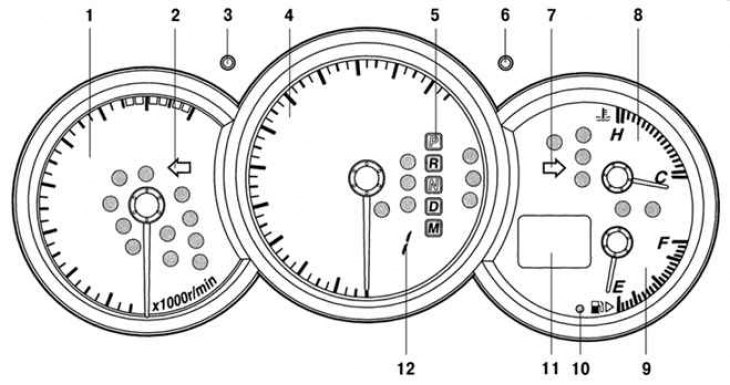
Pic. 1.49. Mazda 3 instrument cluster: 1 - tachometer; 2 - left turn indicator; 3 - button for switching the brightness of the dashboard backlight; 4 - speedometer; 5 - indicator of the included range (automatic transmission); 6 – odometer mode switch button; 7 - right turn indicator; 8 - coolant temperature gauge; 9 - fuel level indicator in the tank; 10 - signaling device for the minimum amount of fuel in the tank; 11 - odometer (indication modes - total mileage or double trip mileage indicator); 12 - gear engaged indicator
The instrument cluster includes: speedometer, tachometer, odometer, pushbutton switches, warning lights and indicators (pic. 1.49).
The instrument cluster has two slightly different versions, depending on the vehicle equipment.
Standard instrument cluster
The total vehicle mileage and trip mileage odometer readings can be seen on the display even when the ignition switch is in the «ACC» (auxiliary consumers of electricity) or «LOCK» (blocking):
- the display continues to work for 10 minutes after the ignition switch has been turned from the position «ON» (ignition on) into position «ACC» (auxiliary consumers of electricity) or «LOCK» (blocking);
- the display continues to work for 10 minutes after the driver's door has been opened.
Instrument cluster with backlight brightness switch
The odometer and trip mileage displays do not work when the ignition switch is in the «ACC» (auxiliary consumers of electricity) or «LOCK» (blocking). However, using the switch button, you can alternately display the readings of the mileage indicator for the trip and reset these readings. The switch operates for approximately 10 minutes after:
- turning the ignition switch from position «ON» (ignition on) into position «ACC» (auxiliary consumers of electricity) or «LOCK» (blocking);
- opening the driver's door.