


The fog lights can be switched on in any position of the central light switch except the "OFF" position.
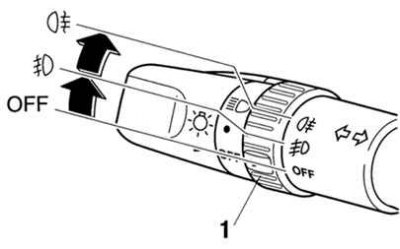
Fig. 1.69. Front fog light switch operating modes: 1 – fog light switch
To turn on the front fog lights, turn the fog light switch handle to the appropriate position (Fig. 1.69). When the front fog lights are turned on, the corresponding indicator located on the instrument panel lights up.
To turn off the front fog lights, turn the fog light switch to the "OFF" position or turn the central light switch to the "OFF" position. When the fog lights are turned off, the fog light indicator on the instrument panel goes out.
Automatic control of lighting devices
If the central light switch is in the "AUTO" position (automatic mode), the front fog lights can be turned on when the headlights, other external lighting devices and instrument panel lighting are on.
The original article is available on: MAZBOOK