


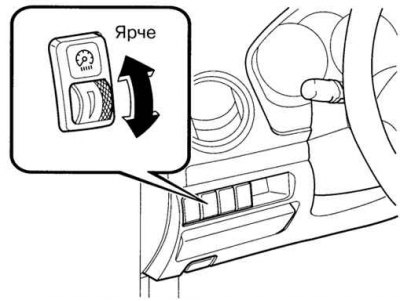
Fig. 1.53. Operation diagram of the instrument cluster backlight controller
With the external lighting devices turned on, rotate the control knob to set the required brightness of the instrument panel lighting (Fig. 1.53).
Note: If the instrument panel backlight dimming function is turned off, the rotary backlight brightness control has no effect.
Adjusting the brightness of the instrument panel backlight (external lighting devices are turned off)
If the external lighting devices are switched off, then by successive pressings of the switch button you can select one of five brightness levels of the instrument panel illumination.
Turning off the instrument panel backlight dimming function (external lighting devices are on)
When the external lighting is turned on, the brightness of the instrument panel backlight decreases. When driving on a snowy road, in fog or in other conditions when visibility of the instrument panel is impaired due to bright external lighting, the switch button allows you to turn off the function of reducing the brightness of the instrument panel backlight. Press the button to increase the brightness of the instrument panel backlight. Press the switch button again to return to the original brightness of the backlight.