


Contents: Lock button ⇓ Unlock button ⇓
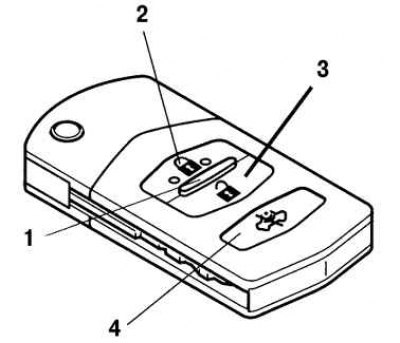
Fig. 1.20. Remote control built into the wearable card "Advanced Key": 1 – indicator; 2 – lock button; 3 – unlock button; 4 – button to disable the interior intrusion sensor (if the car has a security alarm)
When you press any button on the remote control, the indicator built into the remote control lights up (Fig. 1.20).
Lock button
In order to lock all the doors (including tailgate or trunk lid), press the lock button located on the remote control. The direction indicators will flash once.
The doors and the trunk or liftgate will not lock if any of the vehicle doors or the trunk or liftgate is open. After pressing the lock button, make sure that all vehicle doors and the trunk or liftgate are locked. If your vehicle has a double locking system, you must press the lock button twice within three seconds to activate the system.
Unlock button
In order to unlock the doors (including tailgate or trunk lid), press the unlock button. The direction indicators will flash twice.
If none of the doors, the boot lid or the tailgate is opened within 30 seconds after the doors are unlocked using the remote control, the doors will automatically lock again.
[Content based on information from MAZbook.ru]
Button to disable the interior intrusion sensor (if the car has a security alarm)
To disable the interior intrusion sensor (the sensor is an element of the security alarm), press the sensor off button within 20 seconds after pressing the door lock button. The direction indicators will flash three times.