


Contents: Headlights ⇓ Cars without automatic control of…⇓ Cars with automatic control of…⇓ Automatic control of lighting devices ⇓ Headlights with gas-discharge xenon…⇓ Switching headlights (high/low beam) ⇓ High beam headlights alarm ⇓ Headlight corrector ⇓ Cornering Lighting System - AFS…⇓ Daytime running lights ⇓ Front fog lights (some versions) ⇓ Rear fog light ⇓ Type B (cars without front fog…⇓ Direction indicators ⇓ Lane change alarm ⇓
Headlights
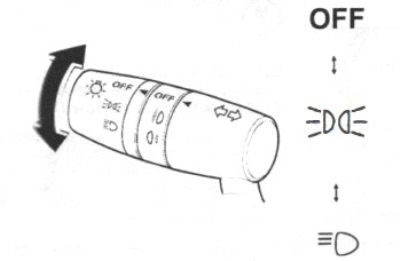
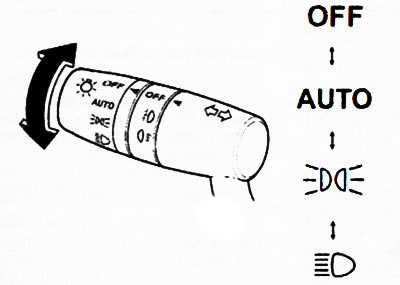
Turn the central switch knob to turn the headlights, other external lights and instrument panel lighting on or off respectively.
In the case of a vehicle with a Type A instrument cluster, if there is a malfunction in the system, check the vehicle condition or contact an authorized Mazda dealer.
Indication of system malfunction or failure to operate is provided.
Note: To avoid draining the battery, do not leave the lights on when the engine is not running (leave the lights on only if required by safety and traffic regulations).
Cars without automatic control of lighting devices
 |
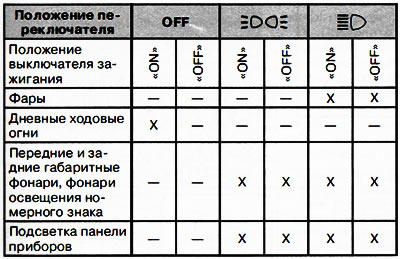 |
Note:
- X: on.
- -: off.
Cars with automatic control of lighting devices
 |
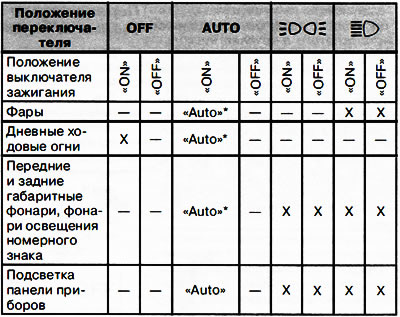 |
Note:
- X: on.
- -: off.
*The lighting device switching mode is set automatically depending on the external lighting registered by the sensor.
Automatic control of lighting devices
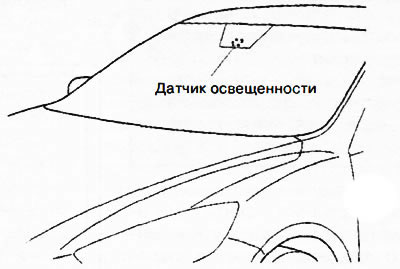
If the central light switch handle is turned to the "AUTO" position (automatic control of lighting devices), then when the ignition is on (the ignition switch is in the "ON" position), the headlights and other external lighting devices, as well as the instrument panel lighting, are turned on and off automatically according to signals from the light sensor - depending on the external lighting conditions.
Attention.
- Do not cover the light sensor with anything (do not apply film or labels to the windshield in the area where the sensor is located). Otherwise, the sensor will not be able to work correctly.
- The light sensor also functions as a rain sensor in the automatic windshield wiper control system. Be careful not to place your hands, the wiper blade or the scraper blade close to the windshield when the windshield wiper is in automatic mode and the ignition is on. When the windshield wiper is turned on automatically, you may injure your fingers, and the wiper blades and arms may be mechanically damaged. If you are going to clean the windshield, make sure that the wiper blades are completely off. This is especially important in winter when you need to clear the windshield of snow or ice – in these cases, the engine is usually running.
Note:
- Lighting devices may not respond immediately and may not turn off immediately after a sharp increase in the level of illumination outside the vehicle if the system determines that this occurred during the dark hours of the day (that is, before this, for several minutes, the illumination level was low). A sharp increase in the illumination level at night can occur, for example, when the car enters a lighted tunnel, when parked in a long traffic jam in a tunnel, when entering a covered lighted parking lot. In such cases, to turn off the lighting devices, turn the central lighting switch to the "OFF" position.
- If the central light switch handle is in the "AUTO" position ("Automatic light control mode"), then when the ignition switch is moved to the "ACC" ("Auxiliary power consumers") or "OFF" ("Ignition off") position, the headlights, other external lighting devices and the control panel illumination will be turned off.
- The brightness of the instrument cluster illumination can be adjusted by rotating the knob/switch located on the instrument cluster. In addition, pressing the knob/switch changes the brightness of the illumination when the exterior lighting is on or off.
- The system sensitivity in "AUTO" mode can be adjusted at an authorized Mazda dealer service center.
Headlights with gas-discharge xenon lamps (some performances)
For low beam headlights, gas-discharge xenon lamps are used, which provide a beam of bright white light and good illumination of the road and the side of the road.
Attention.
- It is prohibited to replace gas-discharge xenon lamps on your own.
- Replacing xenon lamps in headlights on your own is dangerous. If you handle xenon lamps incorrectly, you may get an electric shock, since such lamps operate under high electrical voltage. If you need to replace xenon lamps, contact an authorized Mazda dealer service station.
Note: If the headlights flicker or the brightness of the light has decreased, this indicates that the lamps have reached the end of their service life. Replace the used xenon lamps with new ones. In such cases, you must contact the service station of an authorized Mazda dealer.
Switching headlights (high/low beam)
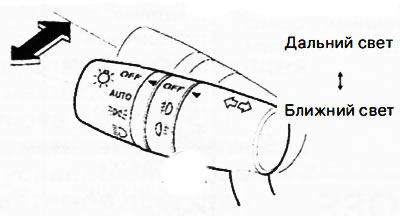
To turn on the high beam, press the lever away from you.
To turn on the low beam, return the lever to its original position.
When the high beam headlights are switched on, the corresponding indicator lights up on the instrument cluster.
High beam headlights alarm
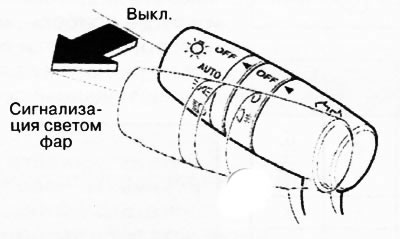
To signal with high beam headlights, pull the lever towards you until it stops (you don't need to turn on the headlights for this). At the same time, the high beam indicator lights up on the instrument cluster. After releasing, the lever automatically returns to its original position.
Headlight corrector
The number of passengers in the vehicle and the weight of the cargo carried in the luggage compartment affect the direction of the headlight beams in the vertical plane.
Automatic headlight corrector
The direction of the light beams is automatically adjusted when the headlights are switched on.
Manual headlight corrector
The corrector handwheel allows you to manually adjust the tilt of the optical axes of the headlights.
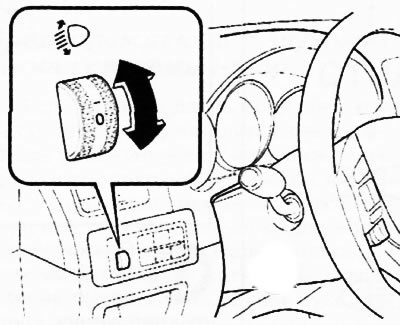
Set the corrector handwheel to one of the working positions in accordance with the table below.
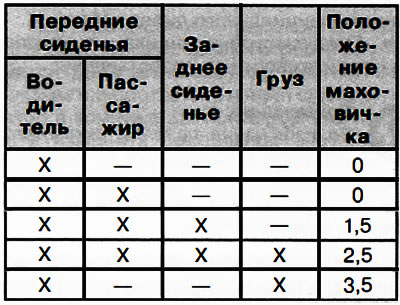
Note:
- X: yes.
- -: No.
Cornering Lighting System - AFS (some versions)
When the headlights are on, the Active Cornering Lighting System (AFS) automatically turns the headlight beams left or right depending on the direction of the steering wheel.
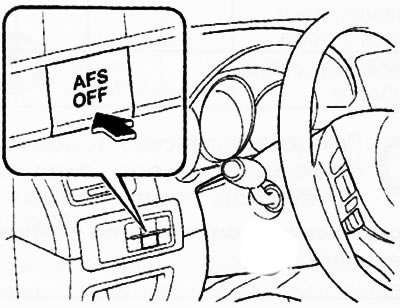
Side Light Switch (AFSOFF)
To turn off the cornering light system, press the "AFS OFF" switch. The "AFS OFF" indicator on the instrument cluster will light. To turn on the cornering light system again, press the "AFS OFF" switch again. The switch button illumination will go out, and the cornering light system will become active when turning. The "AFS OFF" indicator will go out.
Daytime running lights
Some countries require that a moving vehicle have its external lights on even during daylight hours (daytime running lights).
Daytime running lights turn on automatically when the ignition is turned on.
The daytime running lights turn off when the parking brake is applied or when the automatic transmission selector lever is moved to the "P" position (cars with automatic transmission).
Front fog lights (some versions)
Front fog lights improve visibility at night and in foggy conditions. To turn on the front fog lights, turn the fog light switch to the position,
 or
or  (the fog light switch handle does not lock in position
  and returns to the position,
  automatically).
The fog lights can only be switched on when the central light switch is in the position
 or
or  . When the front fog lights are switched on, the corresponding indicator located on the instrument cluster lights up.
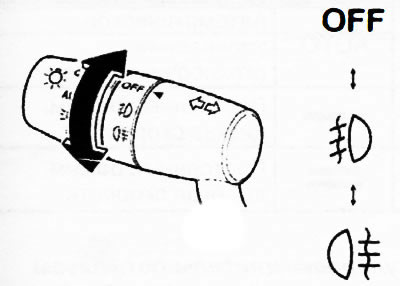
Fog light switch
To turn off the front fog lights, turn the fog light switch to the "OFF" position or turn the central light switch to the "OFF" position. When the fog lights are turned off, the corresponding indicator on the instrument panel goes out.
Note:
- Vehicles with automatic control of lighting devices: if the central lighting switch is in the "AUTO" position (automatic mode), the front fog lights can only be switched on when the headlights, other external lighting devices and instrument panel lighting are switched on.
- If you turn the fog light switch to the position
(the handle of the light switch does not lock in this position and returns to the position
automatically), the rear fog light will also turn on and the corresponding indicator on the instrument cluster will light up.
Rear fog light
The rear fog light makes your car more visible in fog.
Option A (with front fog lights)
The fog light can only be switched on if the central light switch is in the position
 or
or  .
.
To turn on the rear fog light, turn the fog light switch to the position
 (the fog light switch handle returns to the position
  automatically). When the rear fog light is turned on, the corresponding indicator located on the instrument cluster lights up.
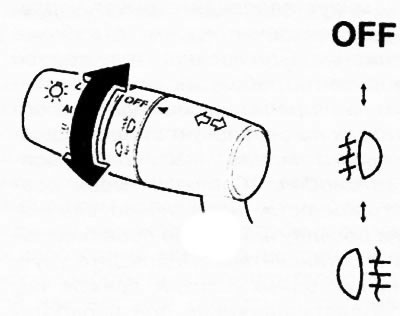
Fog light switch
The rear fog light can be turned off using one of the following methods.
Turn the fog light switch to the on position
 again (the fog light switch handle returns to the,j:D position automatically).
Turn the fog light switch to the "OFF" position.
Turn the central light switch to the "OFF" position.
When the rear fog light is turned off, the corresponding indicator located on the instrument panel goes out.
Note:
- The front fog lights are always on when the rear fog light is on.
- If the fog light switch has been turned to the position
(the switch will return to its original position automatically
then, simultaneously with the fog lights, the fog light indicator on the instrument cluster will turn on.
- Vehicles with automatic headlight control: If the central headlight switch is in the "AUTQ" (Automatic Headlight Control) position, the fog lights can be switched on when the headlights, exterior lights and instrument panel lighting are switched on.
Type B (cars without front fog lights)
The rear fog light can only be switched on when the headlights are switched on.
To turn on the rear fog light, turn the fog light switch to the position
 (the switch will return to its original position automatically). When the rear fog light is switched on, the corresponding indicator located on the instrument cluster lights up.
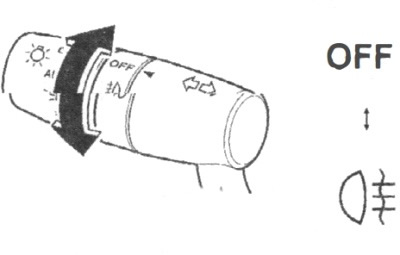
Fog light switch
The rear fog light can be turned off using one of the following methods.
Turn the fog light switch to the on position
 again (the fog light switch handle returns to its original position automatically).
Turn the central light switch to the "OFF" position.
When the rear fog light is turned off, the corresponding indicator located on the instrument panel goes out.
Note:
- Cars with automatic control of lighting devices.
- If the central light switch is in the "AUTO" position ("Automatic control of lighting devices"), the rear fog lamp can be turned on when the headlights, other external lights and instrument panel lighting are turned on.
[The original text can be found on: mazbook.ru]
Direction indicators
Note: If the indicator is constantly on (not flashing) or flashes at an increased frequency, then a possible cause is that one of the turn signal lamps has burned out. It is possible to customize the volume level of the turn signal sound indicator.
Press the lever down (when turning left) or up (when turning right) to a locked position. The lever will automatically return to the partial position and the turn signals will turn off when the car exits the turn.
If the turn signals continue to flash after completing the turn, return the lever to its original position forcibly.
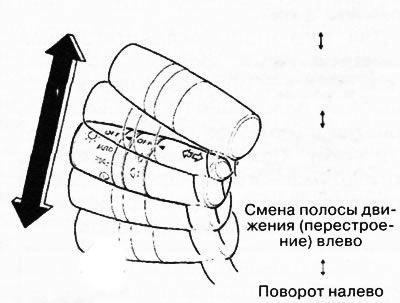
The operation of the direction indicators is accompanied by the flashing of the corresponding green indicators on the instrument panel.
Lane change alarm
To signal a lane change, lightly push the turn signal lever up or down and immediately release it. After releasing the lever, the corresponding turn signals will flash three times.
Note: The Personalization feature allows you to reprogram the number of times the turn signals illuminate when a lane change signal is given.