
MazBook.ru
English Русский
Български
Беларускі
Український
Српски
Hrvatski
Română
Polski
Slovenský
Magyar
• Bookmark • Sitemap • Contacts •   
Cars Opel Cars Ford Cars Volkswagen Cars Audi Cars Kia Cars Renault Cars Peugeot


Familia Capella Mazda3 Mazda6 CX-? Others Articles
Capella 3 (1982-1992, petrol) Capella 3 and 4 (1982-1992) Capella 4 (1987-1992) Capella 5 (1991-1997) Capella 6 (1997-2005, petrol)

Speed control and regulation system (Mazda Capella GC)

  • Home
  • Mazda Capella
  • Capella GC (1982-1992)
  • General information
  • User manual
  • Speed control and regulation system
0
The speed control and regulation system will allow you to automatically control the vehicle speed above 40 km/h.

To turn the system on, press the top of the cruise control system main switch "CRUISE MAIN", located on the instrument panel.

To stop the car, press the bottom of the switch.
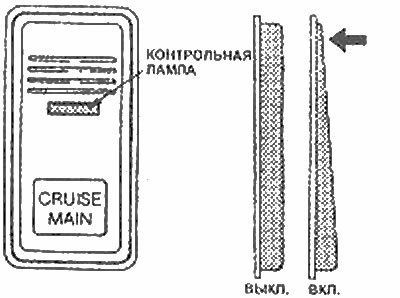
To stop the car, press the bottom of the switch.


To set a constant vehicle speed:
  • 1. Achieve your desired speed (it should be above 40 km/h).
  • 2. Press the "SET" button located at the end of the windshield wiper and washer switch handle. Do not hold down the "SET" button.
  • 3. Release the gas pedal and the car speed will be saved automatically.
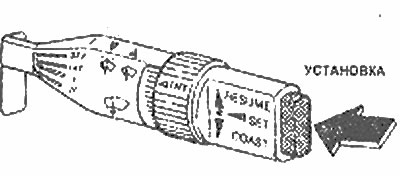
3. Release the gas pedal and the car speed will be saved automatically.


To increase movement speed:
  • 1. Press and hold the "SET" button. The vehicle speed will increase in the control system.
  • 2. Release the button when you reach the desired speed.

To reduce movement speed:


  • 1. Turn the "COAST" button down "COAST-RESUME", located on the windshield wiper and washer switch handle.
  • 2. The car gradually slows down. When the desired speed is reached, release the button. The new speed will be saved automatically.
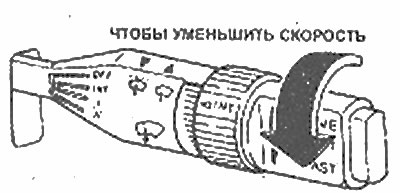
2. The car gradually slows down. When the desired speed is reached, release the button. The new…


To cancel the movement speed:
  • 1. Press the switch "CRUISE MAIN", to turn off the cruise control system or,
  • 2. Lightly press the brake pedal or the clutch pedal (in cars with manual transmission) or,
  • 3. Shift to the "N" position (in cars with automatic transmission).
  • 4. The speed control and regulation system will be automatically switched off if the speed decreases by approximately 15 km/h compared to the selected speed.

[The original article is posted on: MAZBOOK.ru]
4. The speed control and regulation system will be automatically switched off if the speed…


To return to a speed above 40 km/h:


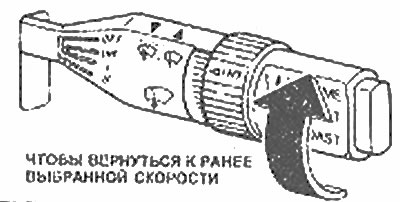
To return to the pre-selected driving speed, turn the button "COAST-RESUME" forward and upward in the "RESUME" direction and release. The vehicle speed will gradually increase and automatically settle at the previously selected speed. If the vehicle speed is less than 40 km / h, the speed control and adjustment system will not perform this function until the vehicle speed exceeds 40 km / h. Reach a speed of more than 40 km / h, then turn the button again "COAST-RESUME" forward to release.

The car will gradually reach the previously selected speed and it will be saved automatically.

Note: If the cruise control system is enabled, you can increase your speed when overtaking another vehicle by pressing the accelerator pedal. Just as you would do during normal movement. When you release the accelerator pedal, the selected driving speed is automatically restored. The speed can be easily changed if your vehicle is going up or down a hill, even if the cruise control system is functioning.


Caution! Do not use the cruise control system in heavy traffic, on slippery surfaces, or in strong winds.
This article is available at: russian, bulgarian, belarusian, ukrainian, serbian, croatian, romanian, polish, slovak, hungarian
This text was checked by: Evdokia Filimonova
Share with friends on social networks:

Previous
Capella 3 » User manual
Next

Ways to use fuel more efficiently.
Power steering with 4-wheel drive (4WS)
Launch on the rise
Automatic transmission
Manual transmission
Lighting and turn signals. Horn
Windscreen washer and wiper lever
Dashboard. Instrument cluster
Double total mileage meter switch
Turn signal and hazard warning lights
More articles on repairing other Mazda models
Bb. Fuel supply control system diagram (on EEC models) Mazda Familia 5 (1985-1989)
Turning off the cruise control system Mazda3 BK (2003-2009)
Door lock control system Mazda6 GG (2002-2008)
All-wheel drive control system Mazda CX-5KE (2012-2017)
Scheme 14. Central locking remote control system unit Mazda BT-50 (1) (2006-2011)
Link in different formats to this article
Comments and feedback from visitors
No comments yet


How much will 30 + 18 ?


Capella 6 (1997-2005, petrol) 
  • General information
  • Introduction to guide
  • User manual
  • Troubleshooting
  • Maintenance
  • Power unit
  • 4-cylinder engines
  • 6-cylinder engines
  • Engine overhaul
  • Cooling and ventilation
  • Power and exhaust systems
  • Engine electrics
  • Control system
  • Transmission
  • Mechanical gearbox
  • Automatic gearbox
  • Clutch and drive shafts
  • Chassis
  • Brake system
  • Car suspension
  • Steering
  • Body
  • Exterior (external elements)
  • Interior (internal elements)
  • Doors, windows and locks
  • Electrical equipment
  • Equipment and devices
  • Electrical circuits
Capella 5 (1991-1997) 
  • General information
  • User manual
  • Maintenance
  • Helpful hints
  • Power unit
  • Petrol engines 1.6 and 1.8
  • Petrol engines 2.0
  • 2.5 petrol engines
  • Overhaul engines 1.6 and 1.8
  • Overhaul engines 2.0 and 2.5
  • Diesel engine 2.0
  • Engine electrics
  • Cooling system
  • Air conditioner
  • Carburetor Nikki 30/34
  • Power system (1.6 and 1.8)
  • Power system (2.0 and 2.5)
  • Control system
  • Transmission
  • Mechanical gearbox
  • Automatic gearbox
  • Clutch and axles
  • Chassis
  • Brake system
  • Suspension and wheels
  • Steering
  • Body
  • Exterior (external elements)
  • Interior (internal elements)
  • Doors and windows
  • Electrical equipment
  • Equipment and devices
  • Electrical circuits
Capella 4 (1987-1992) 
  • General information
  • Introduction to manual
  • Vehicle specifications
  • Power unit
  • Engine repair
  • Lubrication system
  • Cooling system
  • Fuel system (carburetor)
  • Fuel injection (FE)
  • Fuel injection (DOHC)
  • Fuel system (diesel)
  • Ignition system
  • Transmission
  • Clutch
  • Gearbox
  • Drive shafts
  • Chassis
  • Front suspension
  • Rear suspension
  • Steering system
  • Brake system
  • Electrical equipment
  • Equipment and devices
  • Electrical circuits
Capella 3 and 4 (1982-1992) 
  • General information
  • User manual
  • Maintenance
  • Power unit
  • Gasoline engine
  • Engine overhaul (gasoline)
  • Diesel engine
  • Cooling and heating
  • Supply system
  • Ignition system
  • Emission reduction
  • Transmission
  • Clutch
  • Mechanical gearbox
  • Automatic gearbox
  • Drive shafts
  • Chassis
  • Brake system
  • Suspension and wheels
  • Steering
  • Body
  • Exterior (external elements)
  • Interior (internal elements)
  • Electrical equipment
  • Equipment and devices
  • Power devices
  • Electrical circuits
Capella 3 (1982-1992, petrol) 
  • General information
  • User manual
  • Maintenance
  • Troubleshooting
  • Late models
  • Power unit
  • Engine in car
  • Engine overhaul
  • Cooling and heating system
  • Fuel and exhaust system
  • Engine electrical system
  • Emission control system
  • Transmission
  • Mechanical gearbox
  • Automatic gearbox
  • Clutch and drive shafts
  • Chassis
  • Brake system
  • Suspension and wheels
  • Steering
  • Body
  • Exterior (external elements)
  • Interior (internal elements)
  • Electrical equipment
  • Equipment and devices
  • Lighting and lamps
  • Electrical circuits
MazBook.ru © 2018–2026 · Mobile version · Articles and news · Sitemap: EN BG BY UA RS HR RO PL SK HU · Feedback · Site search · Add to bookmarks Familia 5 (BF) · Familia 6 (BG) · Capella 3 (GC) · Capella 3 and 4 (GC) · Capella 4 (GD) · Capella 5 (GE) · Capella 6 (GF) · Mazda3 BK · Mazda6 GG · CX-5KE · Mazda 121 (3) · Mazda BT-50 (1) ·
By continuing to use the site, you agree to the use of cookies 🔐