


- insulate the positive and negative terminals of the battery with cellophane or electrical tape;
- do not disassemble the batteries;
- do not throw batteries into fire or water;
- do not deform or break the batteries.
Attention! The following signs indicate that the battery is discharged:
- - when the engine is not running, the "KEY" indicator flashes (green color), located on the dashboard;
- - the system does not work, when pressing the control buttons the indicator built into the card does not light up;
- - reduction of the range of the portable card.
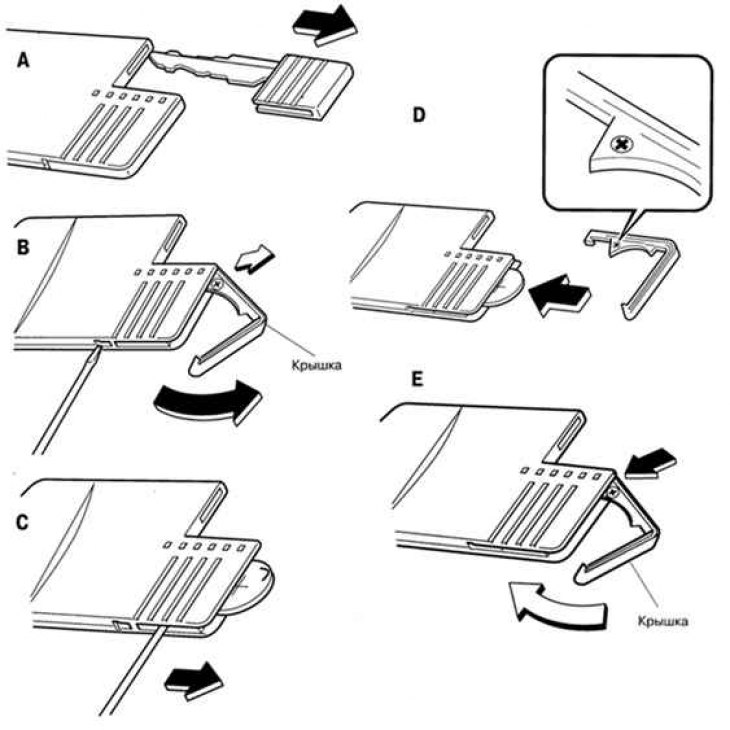
Fig. 1.17. Replacing the battery of the wearable card "Advanced Key"
To avoid damage to the wearable card "Advanced Key" replace the battery only at an authorized Mazda dealer service station. If you replace the battery yourself, do the following: (see fig. 1.17):
- A. Remove the auxiliary key from the card.
- B. Use a flat-head screwdriver to loosen the battery cover. Then twist and remove the cover.
Caution: Do not turn the lid too far, as this may damage it.
- C. Insert the tip of a flat-head screwdriver into the slot and remove the battery.
- D. Insert a new battery (CR2025 or equivalent), so that the positive pole of the element (+) is located on the same side as the (+) marking applied to the cover.
- E. Turn and close the lid.
If your wearable card is lost or stolen, contact your authorized Mazda dealer immediately to have the lost or stolen card replaced and blocked. You must take all of your remaining wearable cards with you "Advanced Key".