
MazBook.ru
English Русский
Български
Беларускі
Український
Српски
Hrvatski
Română
Polski
Slovenský
Magyar
• Bookmark • Sitemap • Contacts •   
Cars Opel Cars Ford Cars Volkswagen Cars Audi Cars Kia Cars Renault Cars Peugeot


Familia Capella Mazda3 Mazda6 CX-? Others Articles
Mazda6 GG (2002-2008)

Rear fog lamp light switch (Mazda 6 GG)

  • Home
  • Mazda 6
  • Mazda6 GG (2002-2008)
  • User manual
  • Controls and instruments
  • Rear fog lamp light switch
0
Contents: Option A (with front fog lights) ⇓ Option B (front fog lights missing) ⇓
The rear fog light makes the car more visible in fog.

Option A (with front fog lights)


The rear fog light can only be switched on when the front headlights are switched on.
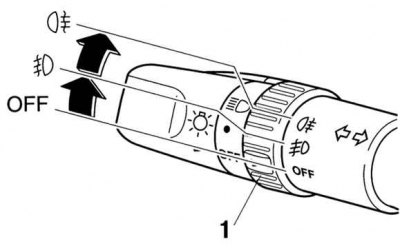
Fig. 1.64. Front fog light switch operating modes: 1 – fog light switch

Fig. 1.64. Front fog light switch operating modes: 1 – fog light switch


To turn on the rear fog light, turn the fog light switch to the appropriate position (see fig. 1.64). The fog light switch returns to its original position automatically.

(Article is based on website data: MAZBOOK)

When the rear fog light is turned on, the corresponding indicator located on the instrument panel lights up.

Option B (front fog lights missing)


The rear fog light can only be switched on when the headlights are switched on.
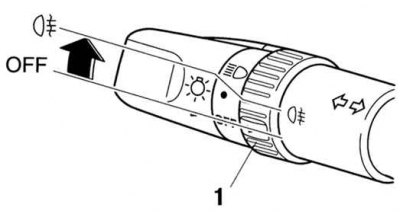
Fig. 1.65. Operating modes of the rear fog light switch: 1 – fog light switch

Fig. 1.65. Operating modes of the rear fog light switch: 1 – fog light switch


To turn on the rear fog light, turn the fog light switch to the appropriate position (Fig. 1.65). The switch returns to its original position automatically. When the rear fog light is turned on, the corresponding indicator located on the instrument panel lights up.
This article is available at: russian, bulgarian, belarusian, ukrainian, serbian, croatian, romanian, polish, slovak, hungarian
This text was checked by: Evdokia Filimonova
Share with friends on social networks:

Previous
Mazda6 GG » Controls and instruments
Next

Light switch for front fog lights
Direction indicator control lever
High-low beam headlight switching modes
Headlights with xenon lamps
Light sensor
Windscreen wipers
Windscreen wiper with adjustable pause in intermittent mode
Windscreen washers
Rear window cleaner
Rear window washer (hatchback vehicles)
More articles on repairing other Mazda models
J. Wiring diagram for the lamps in the door pillars, the ignition… Mazda Familia 5 (1985-1989)
Light level switch Mazda Capella 3 (1982-1992, petrol)
Light switch for rear fog lights Mazda3 BK (2003-2009)
Removal and installation the rear combination light from the car body Mazda CX-5KE (2012-2017)
Checking the oil pressure and warning light switch Mazda 121 (3) (1996-2003)
Link in different formats to this article
Comments and feedback from visitors
No comments yet


How much will 29 + 27 ?


Mazda6 GG (2002-2008) 
  • User manual
  • Vehicle description
  • Keys, locks and alarms
  • Controls and instruments
  • Air conditioning and heater
  • Seat adjustment
  • Security systems
  • Driving and operation
  • Faults en route
  • Maintenance
  • Power unit
  • Engine device
  • Engine repair
  • Lubrication system
  • Cooling system
  • Fuel system
  • Exhaust system
  • Electrical equipment of engines
  • Control system
  • Transmission
  • Clutch
  • Mechanical gearbox
  • Automatic gearbox
  • Drive shafts and hubs
  • Chassis
  • Suspension and wheels
  • Steering
  • Brake system
  • Body
  • Exterior (external elements)
  • Interior (internal elements)
  • Doors and windows
  • Air conditioning and heater
  • Electrical equipment
  • Equipment and devices
  • Power devices
  • Lighting system
  • Windshield wipers and washers
MazBook.ru © 2018–2026 · Mobile version · Articles and news · Sitemap: EN BG BY UA RS HR RO PL SK HU · Feedback · Site search · Add to bookmarks Familia 5 (BF) · Familia 6 (BG) · Capella 3 (GC) · Capella 3 and 4 (GC) · Capella 4 (GD) · Capella 5 (GE) · Capella 6 (GF) · Mazda3 BK · Mazda6 GG · CX-5KE · Mazda 121 (3) · Mazda BT-50 (1) ·
By continuing to use the site, you agree to the use of cookies 🔐