


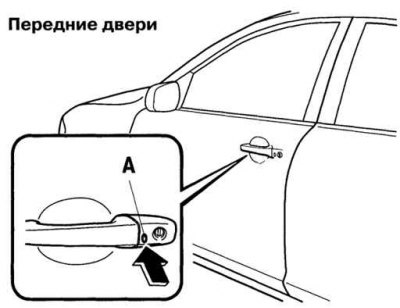
Fig. 1.33. Locking and unlocking the locks using buttons in the outer handles: A - button
If the card is portable "Advanved Key" if the driver has the key, he can lock or unlock all the doors and the trunk lid or the rear luggage compartment door by pressing the button built into the front door handle or located on the rear luggage compartment door (Fig. 1.33).
In order to lock all the doors (including the rear tailgate or trunk lid), press the built-in lock or unlock button. The direction indicators will flash once.
In order to unlock all the doors (including the rear tailgate or trunk lid), press the built-in lock or unlock button. The direction indicators will flash twice.
The button built into the driver's door handle also closes the car windows. Make sure all doors and the trunk or tailgate are securely locked. The doors and trunk or tailgate will not lock if one of them is open.
If your vehicle has a dual locking system, you can activate the system by pressing the lock or unlock button built into the handle of one of the front doors twice within three seconds. You can change the system setting so that a confirmation chime sounds when you lock or unlock the doors and the trunk or rear liftgate using the built-in button.
The system can be configured to automatically lock the doors and trunk lid or rear liftgate without pressing the integrated lock or unlock button.