
MazBook.ru
English Русский
Български
Беларускі
Український
Српски
Hrvatski
Română
Polski
Slovenský
Magyar
• Bookmark • Sitemap • Contacts •   
Cars Opel Cars Ford Cars Volkswagen Cars Audi Cars Kia Cars Renault Cars Peugeot


Familia Capella Mazda3 Mazda6 CX-? Others Articles
Mazda6 GG (2002-2008)

Removal and installation the rear wheel hub (Mazda 6 GG)

  • Home
  • Mazda 6
  • Mazda6 GG (2002-2008)
  • Transmission
  • Drive shafts and hubs
  • Removal and installation the rear wheel hub
0
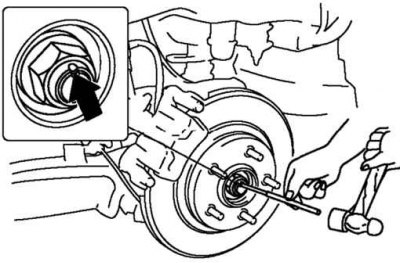
Fig. 3.119. Knocking out the flange of the wheel hub lock nut

Fig. 3.119. Knocking out the flange of the wheel hub lock nut


Knock out the bent part of the lock nut with a small chisel and hammer (fig. 3.119).

Lock the hub by pressing the brake.

Loosen the lock nut.

Attention! The rotor of the anti-lock brake system sensor is removed only in case of its replacement.
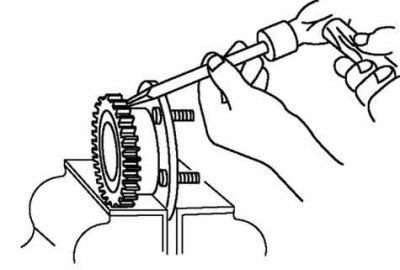

Fig. 3.120. Removing the ABS sensor rotor

Fig. 3.120. Removing the ABS sensor rotor


Using a chisel, remove the ABS sensor rotor (fig. 3.120).
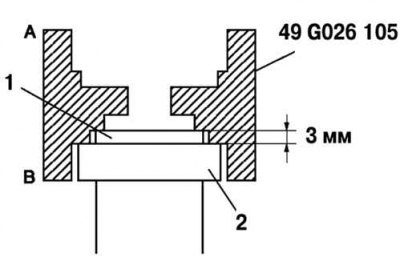
Fig. 3.121. Correct installation of the ABS sensor rotor: 1 – wheel hub; 2 – ABS sensor rotor

Fig. 3.121. Correct installation of the ABS sensor rotor: 1 – wheel hub; 2 – ABS sensor rotor


To install the ABS sensor rotor, orient the special tool so that the B marking faces downwards (fig. 3.121).
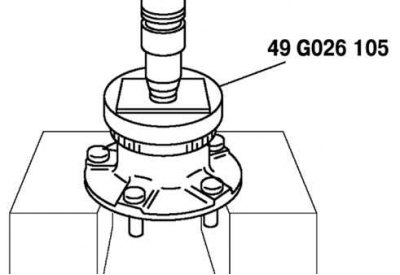
Fig. 3.122. Pressing in the ABS sensor rotor

Fig. 3.122. Pressing in the ABS sensor rotor


Press in the new sensor rotor using a special tool and press (fig. 3.122).
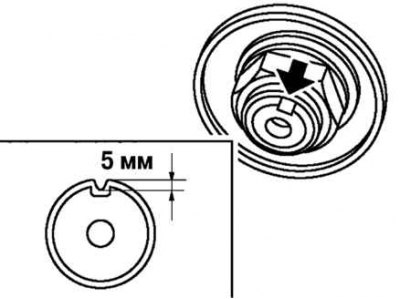
Fig. 3.123. Installing a new lock nut

Fig. 3.123. Installing a new lock nut


The text of the article is taken from the website MAZBOOK.RU

Install a new lock nut and secure it as shown in Figure 3.123.
This article is available at: russian, bulgarian, belarusian, ukrainian, serbian, croatian, romanian, polish, slovak, hungarian
This text was checked by: Evdokia Filimonova
Share with friends on social networks:

Previous
Mazda6 GG » Drive shafts and hubs
Next

Checking the clearance in the rear wheel hub bearing
Rear Wheel Hub Components
Removal and installation the front wheel hub
Checking the front wheel hub bearing clearance
Front drive shafts
Front Drive Shaft Components
Preliminary check of the connecting shaft
Removal and installation the front connecting shaft
Assembly and disassembly of the connecting shaft
Front Drive Components (Manual Transmission)
More articles on repairing other Mazda models
Checking and adjusting the rear wheel alignment angles Mazda Familia 5 (1985-1989)
Inspection and maintenance of the rear wheel bearing Mazda Capella 3 (1982-1992, petrol)
Rear Wheel Hub Components Mazda3 BK (2003-2009)
Removal and installation the rear wheel hub assembly Mazda CX-5KE (2012-2017)
Rear Wheel Speed Sensors — Removal and Installation Mazda BT-50 (1) (2006-2011)
Link in different formats to this article
Comments and feedback from visitors
No comments yet


How much will 20 + 31 ?


Mazda6 GG (2002-2008) 
  • User manual
  • Vehicle description
  • Keys, locks and alarms
  • Controls and instruments
  • Air conditioning and heater
  • Seat adjustment
  • Security systems
  • Driving and operation
  • Faults en route
  • Maintenance
  • Power unit
  • Engine device
  • Engine repair
  • Lubrication system
  • Cooling system
  • Fuel system
  • Exhaust system
  • Electrical equipment of engines
  • Control system
  • Transmission
  • Clutch
  • Mechanical gearbox
  • Automatic gearbox
  • Drive shafts and hubs
  • Chassis
  • Suspension and wheels
  • Steering
  • Brake system
  • Body
  • Exterior (external elements)
  • Interior (internal elements)
  • Doors and windows
  • Air conditioning and heater
  • Electrical equipment
  • Equipment and devices
  • Power devices
  • Lighting system
  • Windshield wipers and washers
MazBook.ru © 2018–2026 · Mobile version · Articles and news · Sitemap: EN BG BY UA RS HR RO PL SK HU · Feedback · Site search · Add to bookmarks Familia 5 (BF) · Familia 6 (BG) · Capella 3 (GC) · Capella 3 and 4 (GC) · Capella 4 (GD) · Capella 5 (GE) · Capella 6 (GF) · Mazda3 BK · Mazda6 GG · CX-5KE · Mazda 121 (3) · Mazda BT-50 (1) ·
By continuing to use the site, you agree to the use of cookies 🔐