


Contents: Traction control and anti-skid…⇓ Anti-skid system off indicator ⇓ Switch "DSC OFF" (fig. 1.156) ⇓
The anti-skid system (ASS) automatically controls wheel braking and regulates the torque developed by the engine, together with the anti-lock and anti-slip systems, which eliminates lateral sliding and skidding of the car when driving on a slippery road surface or during abrupt and energetic maneuvering. The anti-skid system increases the safety of the car.
The anti-skid system operates at vehicle speeds above 20 km/h.
Caution! The anti-skid system may not function properly if the following conditions are not met.
- - All wheels of the vehicle must be equipped with the same tires of the recommended size.
- - All wheels must be fitted with tyres of the same brand, model, size and with identical tread pattern, manufactured at the same factory.
- - It is prohibited to install tires with different degrees of tread wear on a vehicle.
Warning! The anti-skid system may not function properly if anti-skid chains are installed on the wheels or one of the wheels is replaced with a small spare wheel. The reason for the disruption of the normal functioning of the anti-skid system is the difference in the rolling radii of the wheels.
After turning the ignition switch to the "ON" position (ignition on) a clicking sound may be heard from behind the instrument panel. This is part of the anti-skid system's self-diagnosis and does not indicate any malfunction.
Traction control and anti-skid system malfunction indicator/warning light
The indicator lights up for a few seconds after turning the ignition switch to the "ON" position (ignition on). The indicator flashes when the traction control or anti-skid system is activated.
If the indicator continues to light, this may indicate a malfunction of the PBS and PZS systems. Contact an authorized Mazda dealer to have the vehicle checked.
Anti-skid system off indicator
The indicator lights up for a few seconds after turning the ignition switch to the "ON" position (ignition on). The indicator also comes on when the "DSC OFF" switch is pressed and warns the driver that the traction control and anti-skid system are disabled.
Switch "DSC OFF" (fig. 1.156)
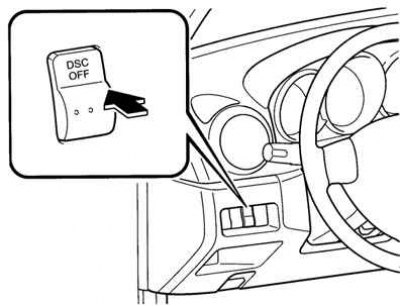
Fig. 1.156. Location of the "DSC OFF" switch
To turn off the traction control and skid control systems, press and hold the "DSC OFF" switch until the "DSC OFF" indicator comes on.
To turn the DSC/CCD systems back on, press the switch again. The "DSC OFF" indicator will go out.
If the traction control system is not disabled, the traction control system will be activated when trying to free the stuck vehicle. When the accelerator pedal is pressed, the torque developed by the engine will not increase.
In such cases, turn off the PBS/CCD systems.
The anti-skid/anti-slip systems, which are disabled when the engine is not running, are automatically enabled when the ignition is turned on. To ensure stable vehicle movement, the anti-skid and anti-slip systems must be enabled.