


Contents: Removal ⇓ Installation ⇓
Caution: The PCM is built into the air cleaner cover.
Caution: Applying excessive force to the cover may damage the PCM.
Caution: Be careful not to touch the PCM with your hands when removing and installing.
Caution: When removing the PCM from the air cleaner, it may be damaged.
Caution: Do not remove the PCM from the air cleaner.
Removal
Remove the battery cover.
Disconnect the negative cable from the battery.
Remove the bottom cover.
Remove the connector cover and PCM connector.
Remove the air filter cover and take out the filter element.
Remove the air filter housing.
Remove the intake air duct cover and air duct.
Disconnect the air hose.
Remove the purge solenoid valve.
Drain the coolant from the engine.
Remove the throttle body.
Disconnect the exhaust gas recirculation pipe (from the intake manifold side).
Disconnect the engine coolant hose from the engine coolant pipe.
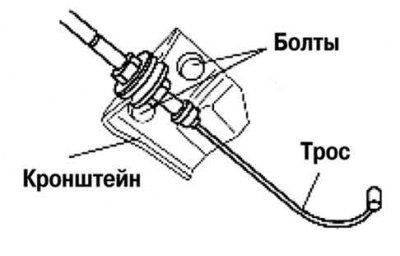
Fig. 2.310. Accelerator cable mounting bracket
Remove the accelerator cable bracket from the intake manifold (fig. 2.310).
Remove the intake manifold.
Installation
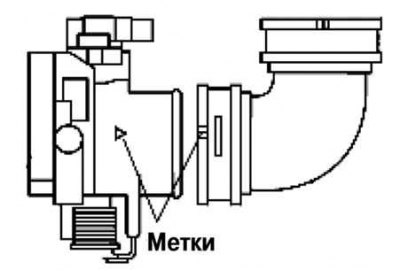
Fig. 2.311. EGR fastening installation procedure
Install the bolts and nut for fastening the exhaust gas recirculation pipe in the order shown in Figure 2.311.
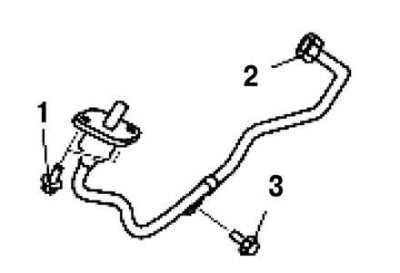
Fig. 2.312. Alignment of the installation marks on the throttle pipe and air hose
Align the marks on the throttle body and air hose (fig. 2.312).
Note: Before installing the intake duct, make sure the rubber mounts on the battery bracket are in place.
[The article is copied from the website mazbook.ru]
Note: Use soapy water when installing the intake duct into the rubber mounts.
Make sure the two rubber mounts are installed on the battery bracket.
Install the intake system air duct into the rubber mounts.
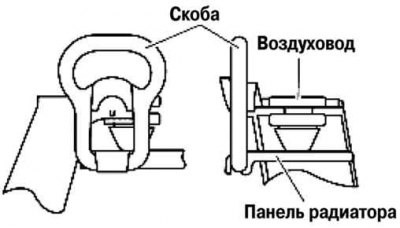
Fig. 2.313. Installing the radiator panel and intake system air duct
Using the bracket, secure the radiator frame panel and the intake air duct as shown in Figure 2.313.
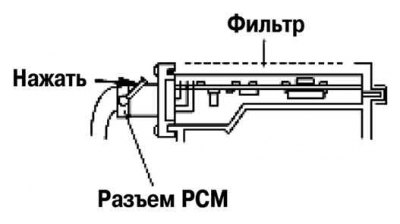
Fig. 2.314. Installing the PCM connector
Fully insert the PCM connector into the air cleaner and push the lever until it clicks into place (fig. 2.314).
Install the remaining components in the reverse order of removal.