


Contents: Since 10/89 issue. ⇓ From 9/85 to 9/89. ⇓
Since 10/89 issue.
Removal
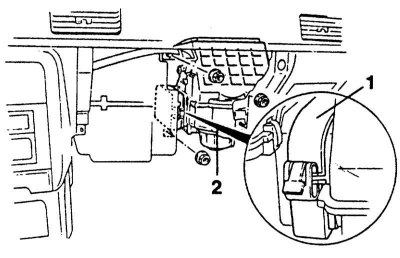
1. Disconnect the ground cable from the battery.
Warning! This will erase the engine fault memory or the radio security code. Before disconnecting the battery, read the instructions in Section Removal and installation the battery.
2. Remove the glove compartment, see Chapter Wheels and tires, body, car painting, car care, Chapter Instrument panel/middle console.
3. Unscrew the fan housing "2".
4. Loosen the fastening bracket and remove the sealing plate "1" together with the fan unit.
5. Disassemble the fan unit or unscrew the pre-resistors.
Installation
1. Install and screw the fan.
2. Compress the sealing plate and secure it with the mounting bracket.
3. Connect the ground cable to the battery.
4. If available, set the time on the clock and set the security code for the radio receiver.
From 9/85 to 9/89.
Removal
1. Disconnect the ground cable from the battery.
Warning! This will erase the engine fault memory or the radio security code. Before disconnecting the battery, read the instructions in Section Removal and installation the battery.
2. Remove the trim at the bottom of the instrument panel.
3. Remove the glove compartment, see Chapter Wheels and tires, body, car painting, car care, Chapter Instrument panel/middle console.
4. Remove the black steel holder from the top of the glove compartment.
5. Remove the air duct between the heater box and the fan unit.
6. Unscrew the 3 fan housing fastening nuts.
7. Remove the intake air flap cable.
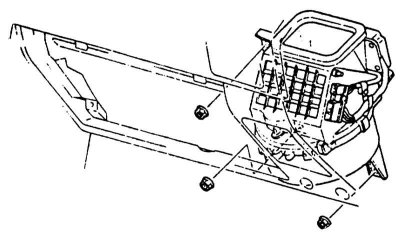
8. Disconnect the multi-pin plug.
9. Remove the fan.
Installation
1. Install and screw the fan.
2. Connect the multi-pin plug.
3. Install the intake air flap cable.
4. Put on the air duct.
5. Install the steel holder in the glove compartment.
6. Install the glove compartment.
7. Install the lower trim.
8. Connect the ground cable to the battery.
9. If available, set the time on the clock and set the security code for the radio receiver.