


Lighting control
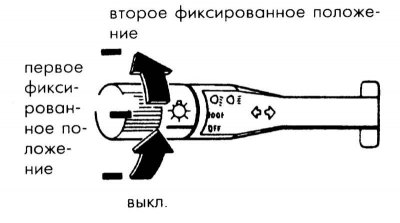
1. To turn on the light, turn the button on the end of the lever.
2. First click: Turns on the parking or side light, rear side lights, number plate light and instrument panel lighting.
3. Second click: Switches on the headlights, taillights, parking lights, license plate lights and instrument panel lights.
4. If you press the lever forward, the high beam will be turned on; if you pull it back, the low beam will be turned on.
Light signal (headlight flashing)
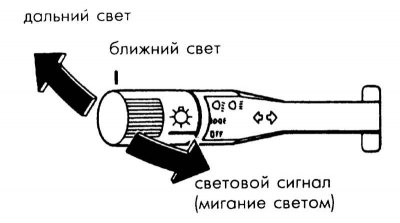
1. To turn on the light signal, pull the lever towards the steering wheel. When released, the lever returns to its original position. The light signal can also be turned on when the headlights are off.
2. When the headlight signal is turned on, the blue high beam indicator lamp lights up.
Lighting system warning signal (if any)
If you forget to turn off the lights when turning off the engine, a melodic signal sounds when the door is opened.
The original article is available on mazbook.ru
Turn signals and lane change signals
Turn signals
1. Move the lever all the way up or down to turn on the turn signal. When the wheels return to the center position, the lever automatically returns to its original position.
Lane change signals
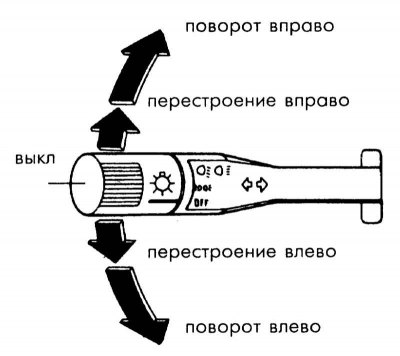
1. Move the lever slightly and hold it. When released, the lever will return to its original position.