


Note:
- When the tire pressure monitoring system is initialized, a learning procedure is started which is completed after the vehicle has been driven for 20 minutes.
- Until the tire pressure monitoring system is trained, its primary functions will not operate.
Checking the Tire Pressure Monitoring System (TPMS) Switch
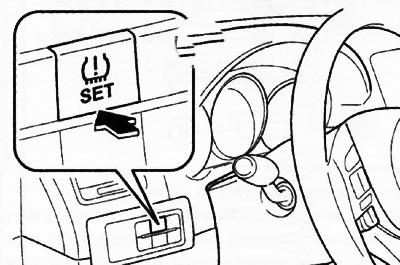
1. Remove the TPMS installation switch together with the switch block from the instrument panel.
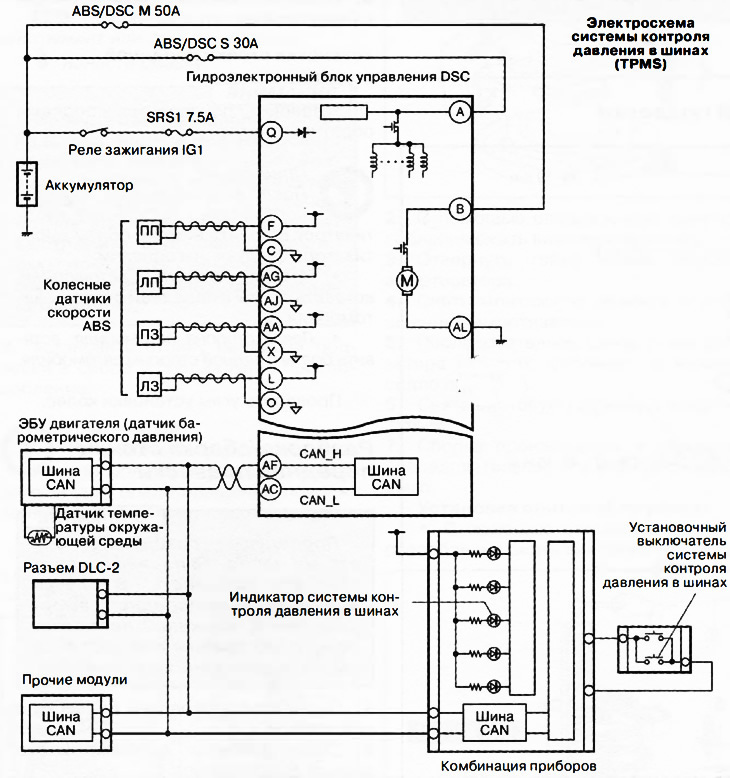
2. Check that the resistance between terminals B and C of the TPMS setting switch is as specified in the table. If the measured resistance is not within the standard, replace the TPMS setting switch.
The Tire Pressure Monitoring System (TPMS) is diagnosed by the on-board diagnostics system, storing the corresponding fault codes in the memory of the electronic control unit.
Initializing the tire pressure monitoring system
Note:
Initialization of the tire pressure monitoring system is necessary after performing the following operations:
- After adjusting the tire pressure.
- After replacing tires or rims.
- After changing the tires on the car.
- After replacing the DSC electronic control unit.
- After disconnecting the DSC electronic control unit.
- After replacing the battery.
- After disconnecting the negative terminal of the battery.
1. Place the vehicle in a safe place on a level surface.
2. Adjust the pressure in all four tires to the norm (pressure adjustment should be done on cold tires).
3. Turn on the ignition (engine off or on).
4. Press and hold the tire pressure monitoring system switch until the tire pressure monitoring system indicator flashes 1 or 2 times and the buzzer sounds 1 time.
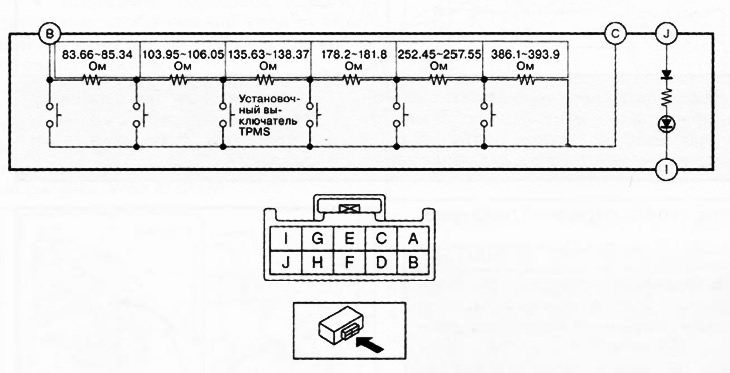

3. Apply battery voltage to terminal J of the TPMS switch and connect terminal 1 to ground.
4. Check that the switch LED lights up. If the LED does not light up, replace the TPMS installation switch with a new one.