MazBook.ru
English Русский
Български
Беларускі
Український
Српски
Hrvatski
Română
Polski
Slovenský
Magyar
• Bookmark • Sitemap • Contacts •   
Cars Opel Cars Ford Cars Volkswagen Cars Audi Cars Kia Cars Renault Cars Peugeot


Familia Capella Mazda3 Mazda6 CX-? Others Articles
Mazda 121 (3) (1996-2003) Mazda BT-50 (1) (2006-2011)

Replacing incandescent lamps (Mazda 121 (3))

  • Home
  • Mazda
  • 121 JASM (1996-2003)
  • Electrical equipment
  • Lighting system
  • Replacing incandescent lamps
0
Contents: Headlights ⇓ Front direction indicators ⇓ Fog light ⇓ Side direction indicator ⇓ Rear lights ⇓ Tail Lights - Fiesta Courier ⇓ License plate light ⇓ Interior lighting ⇓
Turn off the corresponding lighting fixture using the switch.

Headlights


Remove the headlight.

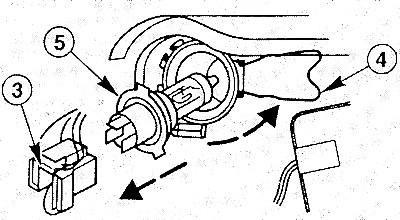
Pull off the low beam lamp plug (3).

Pull off the low beam lamp plug (3).

Press the wire clip (4) upwards and fold it to the side.

Remove the lamp (5).

Press the wire clip back and secure the lamp.

Put on the lamp plug.

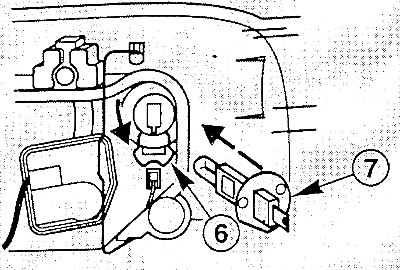
Remove the high beam lamp plug.


Remove the high beam lamp plug.


Press the wire clip (6) to the side and fold it back.

Remove the lamp (7).

Insert the bulb so that the protrusions on the base fit into the recesses on the headlight.

Press the wire clip back and secure the lamp.

Put on the lamp plug.

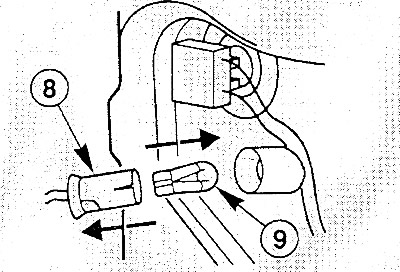
Remove the socket (8) of the parking light bulb.


Remove the socket (8) of the parking light bulb.

Remove the lamp (9) from the socket and replace it.

Insert the socket into the lamp housing.

Install the headlight cover and secure it with a wire clip.

Install the headlight and adjust it in the workshop.

Front direction indicators
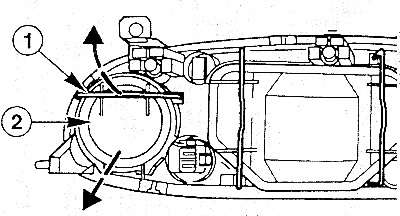


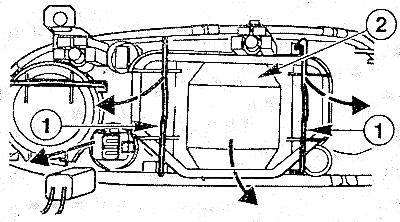
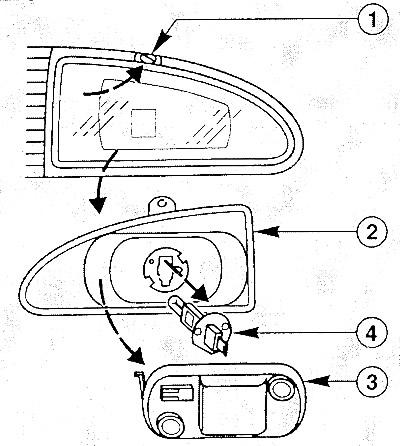
Fold the wire clip (1) upwards.


Fold the wire clip (1) upwards.

Remove the cover (2) of the direction indicator housing.

Turn the lamp holder to the left and remove it.

Press the lamp lightly into the socket, turn it to the right and secure it.


Insert the cartridge into the flashlight and turn it to the right.

Fog light


Unscrew the screw (1) and pull out the lamp mount (2).


Unscrew the screw (1) and pull out the lamp mount (2).

Unhook and remove the cover (3).

Pull the plug off the lamp (4).

Unhook and fold back the wire clip.

Remove the lamp and replace it.

Insert the bulb so that the protrusions on its base fit into the recesses on the headlight.

Fold the wire clip back and secure the lamp.

Put on the lamp plug.

Press and attach the lid.

Install the lamp mount and secure it with the screw.

Side direction indicator


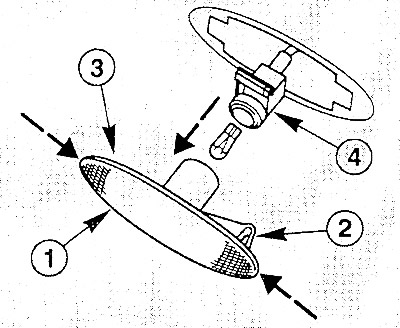
Press the flashlight housing (1), overcoming the force of the plastic holder (2) forward or…


Press the flashlight housing (1), overcoming the force of the plastic holder (2) forward or backward.

Note: The plastic holder can be installed in the front or rear position.


Press the lantern housing out of the wing from the other side (3) and remove it.


Separate the lamp housing from the lamp socket (4) by turning it to the left.

Remove the bulb from the socket and replace it.

Insert the flashlight housing first into position (3) into the hole on the wing, and then into position (2) (mounting bracket) and secure it.

Rear lights


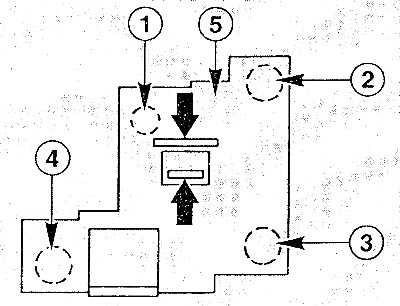
From the trunk, squeeze both tabs on the light mount (5) (arrows).


From the trunk, squeeze both tabs on the light mount (5) (arrows).

Remove the flashlight mount.

Press the faulty lamp slightly into the socket, turn it to the left and remove it.

One lantern contains the following lamps:
  • 1 - overall lighting;
  • 2 - brake signal;
  • 3 - direction indicator;
  • 4 - reversing light or rear fog light.

Insert the new bulb into the socket, press it slightly and secure it by turning it to the right.

Insert the socket with the lamp and secure it.

Tail Lights - Fiesta Courier


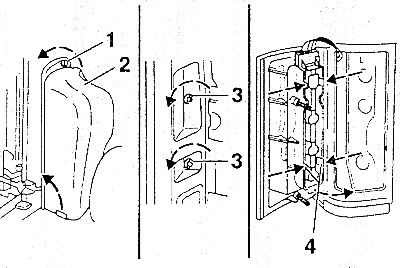
From the cargo compartment, turn the rotary clamp (1) to the left.


From the cargo compartment, turn the rotary clamp (1) to the left.


Unhook the cover (2) at the bottom and remove it.

Unscrew the two nuts on the wing (3).

Pull the bottom part of the flashlight housing out slightly, press it down slightly and carefully remove it.

Squeeze the lower fastening tabs (4) and pull the flashlight mount out a little, then squeeze the upper tabs and remove the flashlight.

Press the damaged lamp slightly into the socket, turn it to the left and remove it.

From top to bottom, the following lamps are located: combined parking light/brake light lamp; turn signal; rear fog light; reversing light.

Insert the new bulb into the socket, press it slightly and turn it to the right.

Insert the lamp holder and secure it.

Check the rear light seal for damage and replace it if necessary.

Insert the lantern and secure it with nuts.

Attach the inner cover at the bottom, press it down on top and secure with the swivel clamp.

License plate light


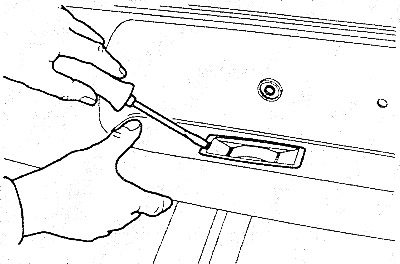
Use a blunt screwdriver to pry the light out of the bumper.


Use a blunt screwdriver to pry the light out of the bumper.

Turn the lamp holder to the left and remove it.

Remove the bulb from the socket and replace it.

Insert the cartridge into the body and secure by turning it to the right.


Press the light into the bumper.

Interior lighting
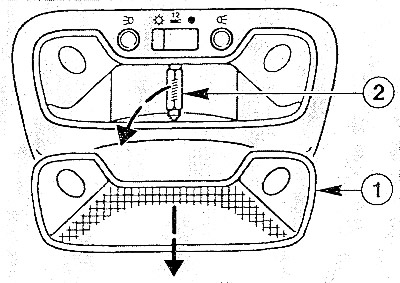


Turn off the flashlight.


Turn off the flashlight.

Pry off the glass of the lantern (1) with a blunt screwdriver.

Caution: The flashlight may be hot, so use a cloth when removing it.


Pull out the spotlight with your fingers and replace it. Check the tightness of the clamps, bend them a little if necessary.

Insert the lantern glass.
This article is available at: russian, bulgarian, belarusian, ukrainian, serbian, croatian, romanian, polish, slovak, hungarian
This text was checked by: Evgeny Mereshnikov
Share with friends on social networks:

Previous
Mazda 121 (3) » Lighting system
Next

Table of incandescent lamps
Lighting System — Ford Fiesta / Mazda 121
Removal and installation headlights
Removal and installation headlight glass
Headlight adjustment
Removal and installation the rear light
Ford KA: Replacing Incandescent Bulbs
More articles on repairing other Mazda models
Replacing external lighting lamps Mazda Familia 6 (1989-1994)
Replacing lamps Mazda Capella 3 and 4 (1982-1992)
Replacing xenon lamps Mazda3 BK (2003-2009)
Replacing xenon lamps Mazda6 GG (2002-2008)
Replacing lamps Mazda CX-5KE (2012-2017)
Link in different formats to this article
Comments and feedback from visitors
No comments yet


How much will 26 + 25 ?


Mazda BT-50 (1) (2006-2011) 
  • General information
  • Introduction to guide
  • User manual
  • Maintenance
  • Power unit
  • Engine repair (diesel)
  • Cooling and lubrication system
  • Fuel injection system
  • Intake and exhaust system
  • Engine electrical equipment
  • Transmission
  • Clutch
  • Mechanical gearbox
  • All-wheel drive system
  • Transfer case and gearboxes
  • Chassis
  • Front suspension
  • Rear suspension
  • Steering
  • Brake system
  • Body
  • Exterior (external elements)
  • Interior (internal elements)
  • Heating and air conditioning
  • Security system SRS
  • Electrical equipment
  • Equipment and devices
  • Electrical circuits
Mazda 121 (3) (1996-2003) 
  • General information
  • User manual
  • Maintenance
  • Power unit
  • Petrol engine 1.3 l
  • Petrol engine 1.25/1.4 l
  • Diesel engine
  • Lubrication system
  • Cooling system
  • Ignition system
  • Supply system
  • Fuel injection (gasoline)
  • Fuel injection (diesel)
  • Exhaust system
  • Transmission
  • Clutch
  • Car gearbox
  • Chassis
  • Front suspension
  • Rear suspension
  • Steering
  • Brake system
  • Wheels and tires
  • Body
  • Exterior (external elements)
  • Interior (internal elements)
  • Doors, windows and locks
  • Heating system
  • Electrical equipment
  • Troubleshooting
  • Equipment and devices
  • Lighting system
  • Power devices
  • Electrical circuits
MazBook.ru © 2018–2026 · Mobile version · Articles and news · Sitemap: EN BG BY UA RS HR RO PL SK HU · Feedback · Site search · Add to bookmarks Familia 5 (BF) · Familia 6 (BG) · Capella 3 (GC) · Capella 3 and 4 (GC) · Capella 4 (GD) · Capella 5 (GE) · Capella 6 (GF) · Mazda3 BK · Mazda6 GG · CX-5KE · Mazda 121 (3) · Mazda BT-50 (1) ·
By continuing to use the site, you agree to the use of cookies 🔐