


Contents: Removal ⇓ Installation ⇓
Generator carbon brushes wear out quite slowly; on average every 120,000 km. It is recommended to replace the brushes a little earlier, for this the generator must be removed.
Removal
1. Remove the generator.
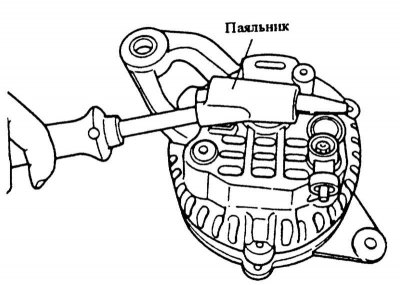
2. Heat the housing to 50°-60°C by holding a 200 W soldering iron over the bearing housing for 3-4 minutes.
Caution: If the bearing housing is not heated, the bearing cannot be removed because the rear bearing and rear mount are very tightly connected to each other.
3. Unscrew and remove the 3 through bolts. Insert a flat-blade screwdriver between the stator and the front mount and separate the two parts.
Caution! Do not insert the screwdriver too deeply, otherwise the stator may be scratched. When separating the parts, make sure that the compressed spring does not jump out in the area of the rear bearing.
4. Carefully clamp the rotor in a vice and unscrew the central bolt of the belt pulley. Remove the belt pulley with the impeller and spacer sleeve.
5. Unscrew the rectifier from the rear cover of the generator.
[The original article is posted on: mazbook]
6. Separate the rear mount and stator from each other.
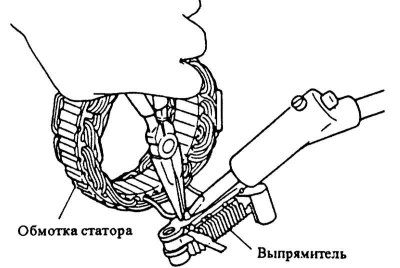
7. Unsolder the stator winding cable from the rectifier holder, holding the terminal with pliers to remove heat from the rectifier. Do not hold the soldering iron for longer than 5 seconds.
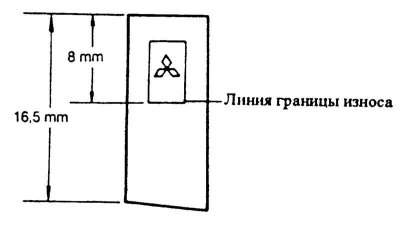
8. Replace carbon brushes if wear limit is reached (length 8 mm and less). To do this, desolder the contacts.
9. Check the wear of the contact rings on the rotor, replace if necessary.
10. Check the ease of movement of both rotor bearings. Replace if necessary. The rear bearing is pressed in, a press is required for replacement.
Installation
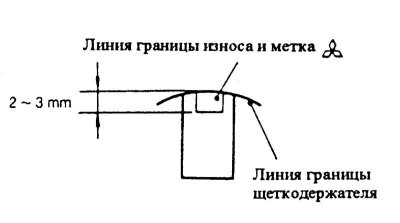
1. Insert the brushes and springs into the holders and solder the contacts. Cut off the protruding sections. At the same time, solder the wires so that the brush wear line is opposite the end of the brush holder by 2-3 mm in front.
2. To prevent solder bumps from rising when soldering new brushes, squeeze the brush contacts with pliers.
Attention! Due to protruding bumps the contacts become hard and the brushes become unusable.
3. After installation, check the ease of movement of the new brushes in the holders.
4. Solder the stator cable to the rectifier board, without overheating the rectifier.
5. Install the rear housing on the rotor and connect.
6. Install the front bearing shield with the spacer sleeve and flange sleeve.
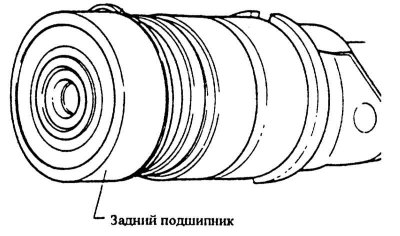
7. Install the impeller with the belt pulley and spring washer and tighten the nut with force 60 Nm.
8. Insert the thrust spring into the eccentric groove of the rear bearing. The protruding part of the spring should enter the deepest part of the groove. The edge of the groove at the deepest point has a chamfer.
Attention! It is necessary to monitor the correct position of the thrust spring, as this reduces the protrusion of the spring relative to the groove, which facilitates assembly. In addition, the spring is not loaded as much and due to this, the thrust effect increases.
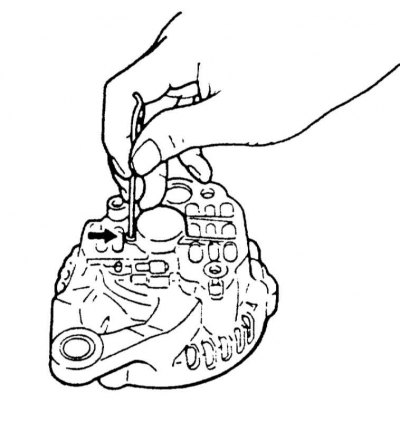
9. Before installation, bend the rectifier connection wires so that they do not touch the rotor. Insert the brushes into the brush holders with your finger, insert a wire into the hole in the rear bearing (diameter 2 mm, length 40-50 mm), thus holding the brushes in the pressed position.
10. Assemble the generator housing, pre-heating the fastener with a soldering iron, see paragraph Removal.
11. Screw the housing together with 3 through bolts.
Caution: Remove the wire holding the brushes from the hole behind the generator.
12. Make sure that the generator can be turned freely by hand.
13. Install the generator.
14. Connect the ground cable to the battery.
15. If available, set the time on the clock and set the security code for the radio receiver.