


Contents: Control panel Type A ⇓ Control panel Type B ⇓
Control panel Type A
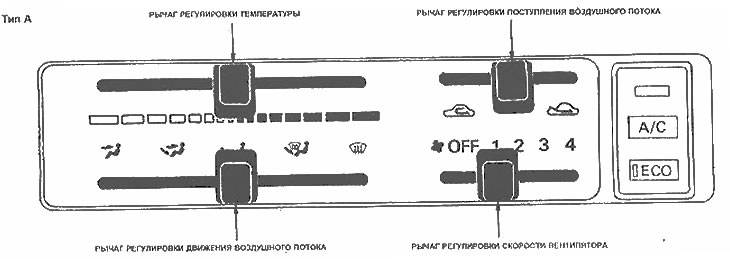
Air flow control lever
The air flow control lever is used to select the direction of air movement. This lever is used to select the operating mode.
Air flow adjustment lever
The air flow control lever is used to select between fresh air from outside and reconditioning of the air inside the vehicle. Use this lever to select the operating mode.
Temperature control lever
This lever is used to select the desired temperature level in the cabin. To increase the temperature, move the lever to the right; to decrease it, move the lever to the left.
Fan speed control lever
- OFF - The fan is off.
- 1 - Low speed
- 2 - Average speed
- 3 - High speed
- 4 - Maximum speed
Control panel Type B
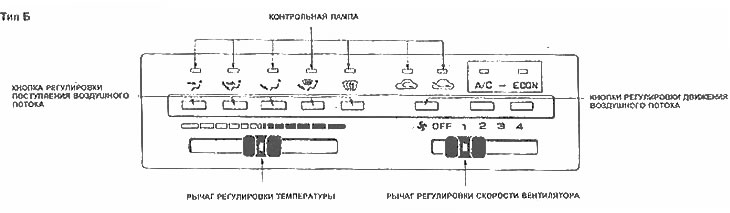
Air flow control buttons
The air flow control buttons are used to select the desired air flow direction. Select the desired ventilation nozzle by pressing the corresponding button. The indicator lamp lights up to indicate the selected operating mode.
Air flow adjustment button
The air flow control button is used to select between fresh air from outside and reconditioning of the air in the cabin. When you press the adjustment button, the operating mode changes
 on
on  or vice versa. The indicator lamp lights up to indicate the selected operating mode: on
Temperature control lever
This lever is used to select the desired temperature level. When you move the lever to the right, the temperature increases; when you move the lever to the left, the temperature decreases.
Fan speed control lever
The fan speed control lever allows you to set different fan speeds.
- OFF - The fan is off,
- 1 - Low speed
- 2 - Average speed
- 3 - High speed
- 4 - Maximum speed