


Type A and B
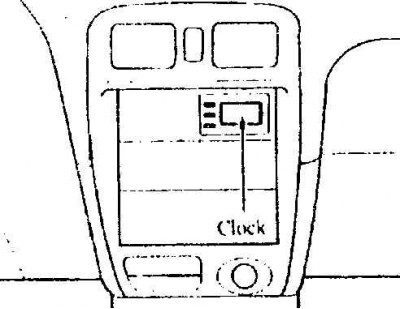
Setting the time
The ignition key must be in the ACC (I) or ON (II) position.
To set the hour
Press the H (hour) button to change the hour display.
To set the minutes
Press the M (minutes) button to change the minutes display.
Type A
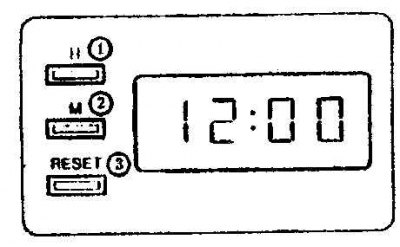
1. Watch
2. Minutes
3. Reset
Type B
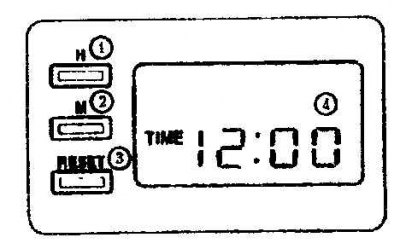
1. Watch
2. Minutes
3. Reset
4. Time
Press the RESET button to reset the minutes. The clock will be set to the hour display.
(The original article is posted on: www.mazbook.ru)
For example, if the RESET button was pressed between 9:00 and 9:29, the time will be set to 9:00. If it was pressed between 9:30 and 9:59, the time will be set to 10:00.
9:01 – 9:29 = 9:00
9:30 – 9:59 = 10:00
When the power is turned off, the time is automatically reset to 1:00.
Type C
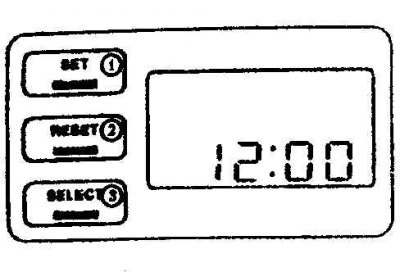
1. Install
2. Reset
3. Select
Setting the time
The ignition key must be set to the ACC (I) or ON (II) position.
Press the SET button (install) and hold it down for about 2 seconds until the time display starts flashing. Release the button. Then press the SET button again to set the minutes and hours.
After setting the time, press the SELECT button to start the clock.
When the clock display is flashing, press the RESET button to reset the display. The clock will be set to show the time in hours.
If the clock is reset when the display is between 9:01 and 9:29, for example, the time will be reset to 9:00. If the clock is reset between 9:30 and 9:59, the time will be reset to 10:00.
When the power is turned off, the time is automatically reset to 1:00.
Тип D
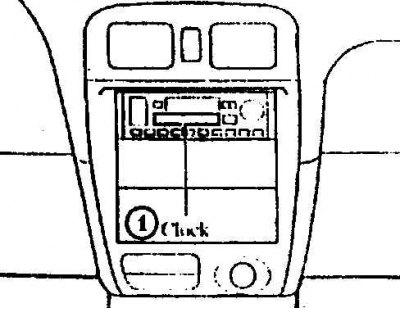
1. Watch
If the car is equipped with an audio system, the clock is built into the system itself.