


Lighting control
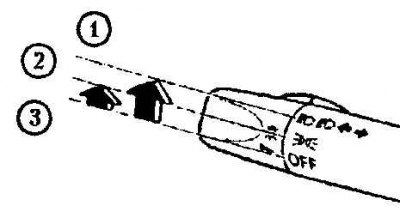
1. Second click
2. First click
3. Disconnection
To turn on the headlights, turn the switch on the control lever.
Turning the switch to the first click turns on the taillights, instrument panel lighting, parking lights and license plate lights.
Turning the switch to the second click turns on the headlights, taillights, instrument panel lighting, parking lights and license plate lights.
Indicator for leaving the light on
If you stop the engine and leave the lights on, a sound signal will sound when you open each door.
Caution: To avoid draining the battery, do not leave the lights on when the engine is not running.
High beam headlights
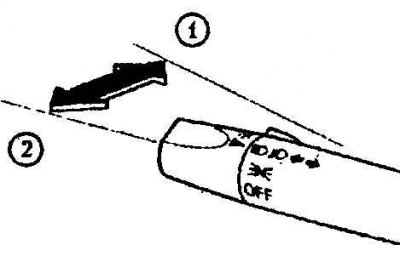
1. High beam
2. Low beam
Push this lever away from you to turn on the high beam headlights, pull it towards you to turn on the low beam headlights. The high beam indicator on the instrument panel is blue.
Flashing headlights
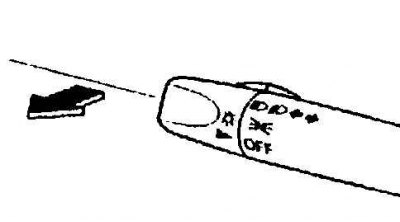
To flash the headlights, pull the lever all the way towards you. The headlight switch does not necessarily have to be in the on position, and the lever will return to its normal position when released.
The high beam indicator on the instrument panel is blue.
Setting headlight level*
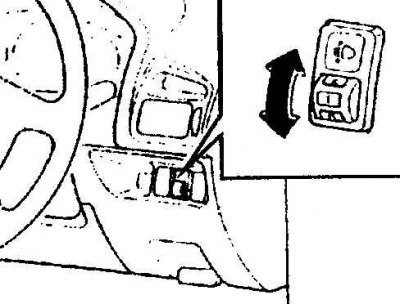
The number of passengers and the weight of the cargo in the trunk change the angle of the headlights.
This angle is adjusted by the headlight leveling switch. Select the appropriate installation from the diagram below.
Front seat Rear seat Load Switch position Driver Passenger X – – – 0 XX – – 0 XXX – 1 XXXX 2 X – – X 3 X: yes; -: No.
Traffic lights*
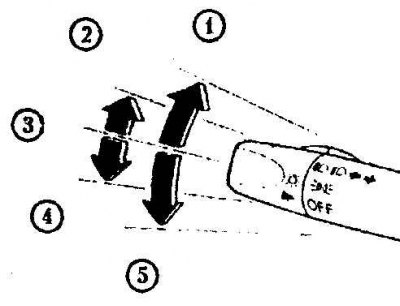
1. Right turn
2. Move to the lane located to the right
3. Shutdown
4. Moving to the lane located to the left
5. Left turn
Some countries require that lights be turned on while vehicles are moving (traffic lights) during the daytime.
The driving lights turn on automatically when the ignition key is turned to the ON (II) position. They turn off when the parking lights are turned on.
Front fog lights*
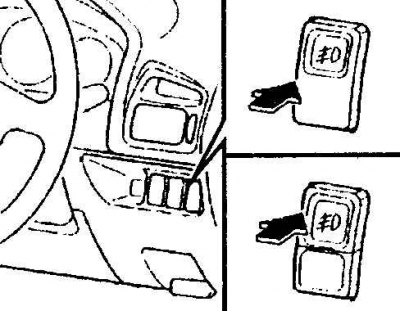
Use this switch to turn on the front fog lights. They will help you see in fog as well as in the absence of fog.
To turn on the front fog lights, first set the regular headlight switch to the on position.
Then press the front fog light switch.
To turn off the fog lights, press the fog light button again or turn the headlight switch to the off position.
Rear fog lights*
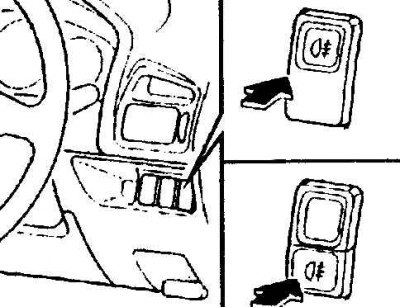
Use this switch to turn on the rear fog lights. Rear fog lights make your car more visible.
To turn on the rear fog lights, turn on the regular headlights and then press the rear fog light button.
To turn them off, press the button to turn them on again or turn off the regular headlights.
If your vehicle is equipped with front fog lights, you can turn on the rear fog lights when the front fog lights are on.