


Contents: Switch blocks ⇓ Individual switches ⇓
Disconnect the cable from the negative battery terminal.
Switch blocks
Remove the instrument cluster.
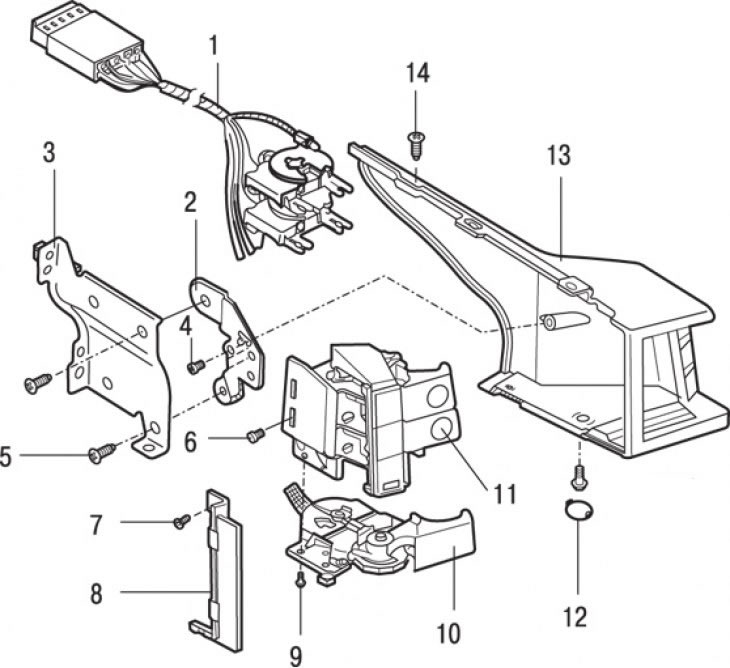
Figure 13.46. Fastening elements of the right switch block: 1 – wiring harness with connector; 2, 3 – brackets; 4, 5 – bracket mounting screws; 6, 7, 14 – casing fastening screws; 8 – casing; 9 – windshield wiper switch mounting screw; 10 – windshield wiper switch; 11 – Windshield washer switch and one-time wiper switch; 12 – screw and plug; 13 – switch casing
Remove the screws, disconnect the connector and remove the desired switch block from the instrument cluster housing (figure 13.46, 13.47). To disconnect the connector, use a screwdriver to press the connector lock (figure 13.48).
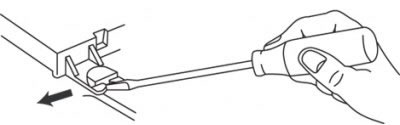
Figure 13.48. Using a screwdriver to release the connector latch
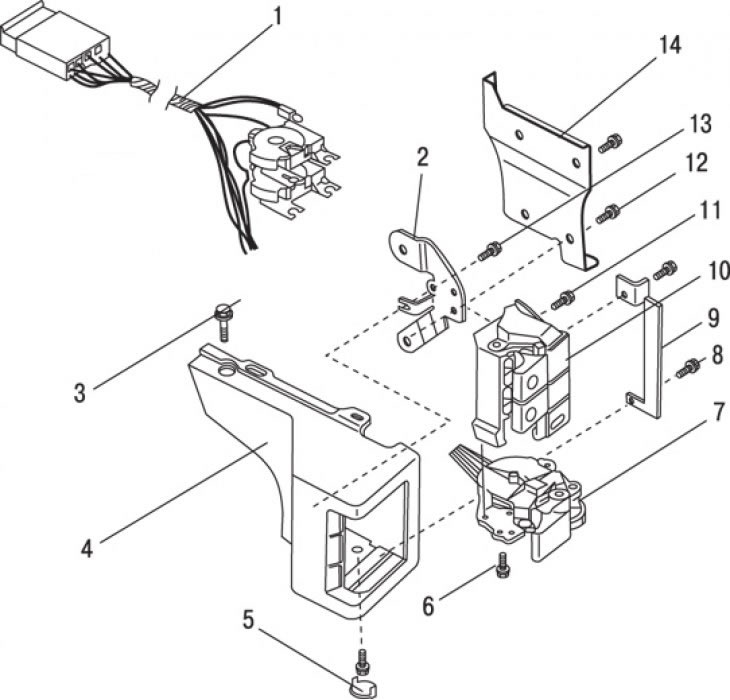
Figure 13.47. Left switch block fastening elements: 1 – wiring harness with connector; 2 – bracket; 3 – casing fastening screw; 4 – switch casing; 5 – screw and plug; 6 – headlight switch mounting screw; 7 – headlight switch; 8 – casing fastening screw; 9 – casing; 10 – Hazard warning lights and rear window defroster switch; 11 – screw for fastening the switch block; 12 – bracket mounting screw; 13 – screw; 14 – bracket
Content based on information from mazbook
Installation is carried out in the reverse order of removal.
Individual switches
Carefully press the switch out of its socket, disconnect the connector and remove the switch.
Installation is carried out in the reverse order of removal.