
MazBook.ru
English Русский
Български
Беларускі
Український
Српски
Hrvatski
Română
Polski
Slovenský
Magyar
• Bookmark • Sitemap • Contacts •   
Cars Opel Cars Ford Cars Volkswagen Cars Audi Cars Kia Cars Renault Cars Peugeot


Familia Capella Mazda3 Mazda6 CX-? Others Articles
Capella 3 (1982-1992, petrol) Capella 3 and 4 (1982-1992) Capella 4 (1987-1992) Capella 5 (1991-1997) Capella 6 (1997-2005, petrol)

Generator repair with complete disassembly (Mazda Capella GC)

  • Home
  • Mazda Capella
  • Capella GC (1982-1992)
  • Electrical equipment
  • Power devices
  • Generator repair with complete disassembly
0
Remove the generator from the vehicle.

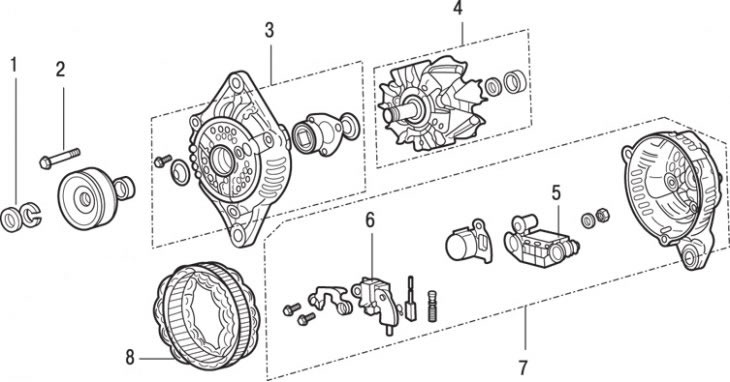
Figure 13.10. Generator: 1 – pulley mounting nut and washer; 2 – screw; 3 – front cover (drive…

Figure 13.10. Generator: 1 – pulley mounting nut and washer; 2 – screw; 3 – front cover (drive side), bearing and stop washer; 4 – rotor and rear bearing; 5 – rectifier; 6 – voltage regulator and brush holder plate; 7 – rear cover with bearing housing; 8 – stator


Loosen the pulley mounting nut and remove the washer (figure 13.10). While unscrewing the nut to prevent the pulley from turning, squeeze the old drive belt with a clamp.

Remove the pulley and impeller (if the impeller is mounted separately on the shaft), spacer sleeve and disc washer.

Remove the three screws securing the rear cover of the generator.

Using a 200W soldering iron, heat the back cover with the bearing housing for 3-4 minutes or blow hot air on it for a longer period of time (see Figure 13.7). Finally, it is necessary to heat the bearing housing to a temperature of 50–60°C without heating other parts.

Without allowing the rear cover to cool, remove the front cover with the rotor by inserting a screwdriver blade between the front cover and the stator core. Be careful not to damage the stator windings.


Use a light tap to knock the rotor out of the front bearing.

Unscrew the terminal "B" fastening nut and remove the washer. Remove the three screws from the back cover that secure the rectifier, regulator plate and brush holder. Remove the stator, rectifier and other parts from the cover.

If electrical testing is to be performed on the stator or rectifier, unsolder the leads and separate them from each other. Mark the location of the pins to avoid confusion during assembly. Solder quickly to prevent the rectifier from failing due to overheating.

Replace the commutator brushes.
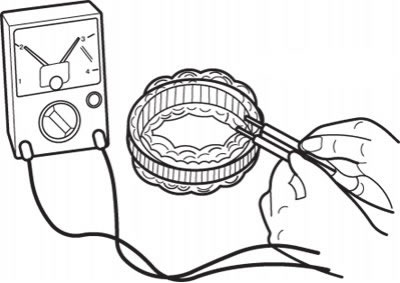
Figure 13.11. Using an ohmmeter to check the conductivity of the stator windings

Figure 13.11. Using an ohmmeter to check the conductivity of the stator windings


Using an ohmmeter or a 12V lamp connected in series with a power source, check the stator windings for breaks (figure 13.11). There must be conductivity between any pair of terminals.
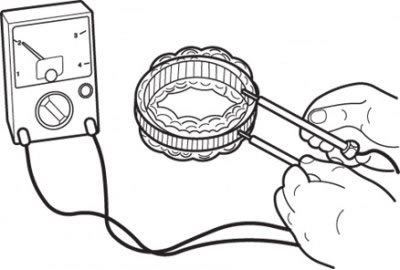
Figure 13.12. Using an ohmmeter to check the continuity between the coil and the stator core

Figure 13.12. Using an ohmmeter to check the continuity between the coil and the stator core


Check the short circuit of the stator coil to the core. Make sure there is no conductivity between the coil and the core, otherwise replace the stator (figure 13.12).

Check the generator rotor for damage, paying particular attention to the commutator slip rings. Minor burn marks can be removed by sanding with fine-grit sandpaper, then wiping with a soft cloth slightly dampened with solvent. A badly worn rotor must be replaced.
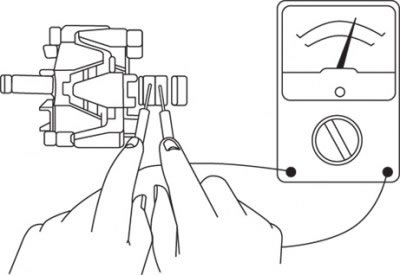
Figure 13.13. Using an ohmmeter to check the continuity between the rotor slip rings

Figure 13.13. Using an ohmmeter to check the continuity between the rotor slip rings


Check the rotor coil. Make sure there is continuity between the slip rings (figure 13.13). If the resistance is too low, there is a short circuit in the coil. If there is no continuity or a short circuit, replace the rotor.
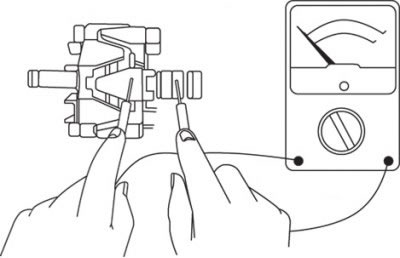
Figure 13.14. Using an ohmmeter to check the continuity between the rotor slip ring and the armature

Figure 13.14. Using an ohmmeter to check the continuity between the rotor slip ring and the armature


Check the rotor coil short circuit to the armature. Make sure there is no conductivity between the slip ring and the rotor armature (figure 13.14). If there is continuity, replace the rotor.

Check for free rotation and play in the rotor bearings. If the condition of the bearings is in doubt, replace them. Make sure the rotor bearing is installed correctly on the collector side (the groove for the retaining ring must be directed towards the contact rings).

Check the continuity of the three diodes by connecting the ohmmeter probes to both ends of each diode. Conductivity must be in one direction only.

If conductivity is detected in both directions, the diode is broken and the rectifier must be replaced.

Assembly of the generator should begin with soldering the terminals of the regulator plate, stator and rectifier.

Install the soldered parts into the back cover and secure with screws, installing a washer and tightening the nut securing terminal "B".

Carefully press the brushes in, fixing their position with a thin rod or drill, inserting it through the hole in the back cover. The new brushes have special holes into which the retainer fits.

Make sure the rear bearing snap ring is in the bearing groove (see Figure 13.9). Heat the rear bearing cap in the same way as when removing it and install the rotor.

Install the disc washer onto the rotor shaft, ensuring it is oriented correctly.

Place the front cover over the rotor and tap it into place using light pressure. Screw in the three screws that secure the covers.


Install the second disc washer, spacer sleeve, impeller and pulley. Use a clamp to tighten the drive belt, install the washer and screw on the nut.

Pull out the lock that holds the brushes in the retracted position, then install the generator on the vehicle.
This article is available at: russian, bulgarian, belarusian, ukrainian, serbian, croatian, romanian, polish, slovak, hungarian
This text was checked by: Georgy Afanasyev
Share with friends on social networks:

Previous
Capella 3 and 4 » Power devices
Next

Replacing generator brushes
Generator — removal and installation
Checking the electrical supply system
General information and precautions
Battery — removal and installation
Checking power wires
Checking the battery
Checking the density of the electrolyte
General information about the engine starting system
More articles on repairing other Mazda models
Repair of cylinder head of engines B3, B5, B6 Mazda Familia 5 (1985-1989)
Checking the generator on the car Mazda3 BK (2003-2009)
Car body dent repair Mazda6 GG (2002-2008)
Temporary tyre repair kit (optional) Mazda CX-5KE (2012-2017)
General information about the generator Mazda 121 (3) (1996-2003)
Link in different formats to this article
Comments and feedback from visitors
No comments yet


How much will 28 + 32 ?


Capella 6 (1997-2005, petrol) 
  • General information
  • Introduction to guide
  • User manual
  • Troubleshooting
  • Maintenance
  • Power unit
  • 4-cylinder engines
  • 6-cylinder engines
  • Engine overhaul
  • Cooling and ventilation
  • Power and exhaust systems
  • Engine electrics
  • Control system
  • Transmission
  • Mechanical gearbox
  • Automatic gearbox
  • Clutch and drive shafts
  • Chassis
  • Brake system
  • Car suspension
  • Steering
  • Body
  • Exterior (external elements)
  • Interior (internal elements)
  • Doors, windows and locks
  • Electrical equipment
  • Equipment and devices
  • Electrical circuits
Capella 5 (1991-1997) 
  • General information
  • User manual
  • Maintenance
  • Helpful hints
  • Power unit
  • Petrol engines 1.6 and 1.8
  • Petrol engines 2.0
  • 2.5 petrol engines
  • Overhaul engines 1.6 and 1.8
  • Overhaul engines 2.0 and 2.5
  • Diesel engine 2.0
  • Engine electrics
  • Cooling system
  • Air conditioner
  • Carburetor Nikki 30/34
  • Power system (1.6 and 1.8)
  • Power system (2.0 and 2.5)
  • Control system
  • Transmission
  • Mechanical gearbox
  • Automatic gearbox
  • Clutch and axles
  • Chassis
  • Brake system
  • Suspension and wheels
  • Steering
  • Body
  • Exterior (external elements)
  • Interior (internal elements)
  • Doors and windows
  • Electrical equipment
  • Equipment and devices
  • Electrical circuits
Capella 4 (1987-1992) 
  • General information
  • Introduction to manual
  • Vehicle specifications
  • Power unit
  • Engine repair
  • Lubrication system
  • Cooling system
  • Fuel system (carburetor)
  • Fuel injection (FE)
  • Fuel injection (DOHC)
  • Fuel system (diesel)
  • Ignition system
  • Transmission
  • Clutch
  • Gearbox
  • Drive shafts
  • Chassis
  • Front suspension
  • Rear suspension
  • Steering system
  • Brake system
  • Electrical equipment
  • Equipment and devices
  • Electrical circuits
Capella 3 and 4 (1982-1992) 
  • General information
  • User manual
  • Maintenance
  • Power unit
  • Gasoline engine
  • Engine overhaul (gasoline)
  • Diesel engine
  • Cooling and heating
  • Supply system
  • Ignition system
  • Emission reduction
  • Transmission
  • Clutch
  • Mechanical gearbox
  • Automatic gearbox
  • Drive shafts
  • Chassis
  • Brake system
  • Suspension and wheels
  • Steering
  • Body
  • Exterior (external elements)
  • Interior (internal elements)
  • Electrical equipment
  • Equipment and devices
  • Power devices
  • Electrical circuits
Capella 3 (1982-1992, petrol) 
  • General information
  • User manual
  • Maintenance
  • Troubleshooting
  • Late models
  • Power unit
  • Engine in car
  • Engine overhaul
  • Cooling and heating system
  • Fuel and exhaust system
  • Engine electrical system
  • Emission control system
  • Transmission
  • Mechanical gearbox
  • Automatic gearbox
  • Clutch and drive shafts
  • Chassis
  • Brake system
  • Suspension and wheels
  • Steering
  • Body
  • Exterior (external elements)
  • Interior (internal elements)
  • Electrical equipment
  • Equipment and devices
  • Lighting and lamps
  • Electrical circuits
MazBook.ru © 2018–2026 · Mobile version · Articles and news · Sitemap: EN BG BY UA RS HR RO PL SK HU · Feedback · Site search · Add to bookmarks Familia 5 (BF) · Familia 6 (BG) · Capella 3 (GC) · Capella 3 and 4 (GC) · Capella 4 (GD) · Capella 5 (GE) · Capella 6 (GF) · Mazda3 BK · Mazda6 GG · CX-5KE · Mazda 121 (3) · Mazda BT-50 (1) ·
By continuing to use the site, you agree to the use of cookies 🔐